
Sound Collection vs Royalty-Free Music for Instagram: What’s Safe for Ads & Clients

If you post a Reel with music and it plays fine, you can still hit a wall the moment you boost it. Instagram reviews boosted posts and ads through Ads Manager, and that review checks music rights more strictly than a normal Feed post, Story, or Reel. Placements also change the outcome. The same video can run on Reels only, or it can expand into Feed, Stories, and Explore, and each path raises different music risks.
This guide helps you choose between Instagram Sound Collection and licensed royalty-free music, based on what you plan to do next. You will learn when Sound Collection fits a quick organic publish, and when a license gives you safer reuse for client work, brand pages, and paid campaigns. You will also get a proof pack checklist you can save, so you can show rights fast if Instagram flags, mutes, or limits delivery.


Instagram Sound Collection vs licensed music: what changes when you boost or run ads
A Reel can feel “approved” when you post it, then get blocked the moment you add budget. Boosting and ads move your post into Ads Manager, where Instagram runs a stricter review for what’s allowed, what gets flagged, and safer alternatives for music rights. You also choose placements, and that choice shapes what Instagram accepts. A video that runs fine in Reels can run into trouble once it expands into Feed or Stories placements, or when it needs delivery at scale.
Sound Collection can work when you publish fast and keep the post organic. Licensed royalty-free music fits campaigns where you need clear permission, repeatable results, and a clean record you can share with a client. The key difference comes from proof. Sound Collection keeps everything inside Meta’s tools. A license gives you paperwork you can save and show.
Quick comparison table
Use this quick comparison to decide what fits your plan, then pick royalty-free music for Instagram Reels, Stories, posts, and ads that keep your workflow stable.
| Use case | Sound Collection | In-app music | Licensed royalty-free |
|---|---|---|---|
| Reels (organic) | Works for many organic Reels when you pick tracks from Sound Collection | Works for personal style posts, availability varies by account and region | Works when your license covers Instagram and your use |
| Stories | Works for organic Stories with Sound Collection tracks | Works for personal style Stories, selection can shrink on business accounts | Works when your license covers Stories use |
| Feed posts | Works for organic Feed posts, keep the track choice consistent | Works for quick posts, rights and availability change often | Works for brand posts and planned publishing |
| Boosted posts | Can work, yet review can block delivery depending on track and setup | Often fails once you boost because rights do not follow paid use | Best choice for boosting when you want stable delivery |
| Reels ads, Stories ads, Feed ads (placements) | Can work in ads workflows, results depend on track and placement choices | High risk in ads placements because music rights often do not cover paid delivery | Best choice for ads across placements when the license covers paid use |
| Client work, UGC allowlisting | Weak fit for client delivery since you cannot hand over a license file | Weak fit for client delivery since you cannot provide proof | Strong fit for client work because you can share proof and terms |
| Cross-platform reuse | Limited if you plan to reuse on TikTok, YouTube Shorts, or other channels | Limited since rights stay tied to the platform library | Strong fit when your license covers each platform you plan to use |
| Proof available (license, invoice) | No downloadable license file for your project | No license file, you only have in-app selection | Yes, you can save a license file and invoice for the project |
| Risk level | Medium for organic, higher when you boost or run ads | High when you boost, run ads, or work for a brand | Low when the license matches Instagram and your use |
Instagram music troubleshooting for Reels, Stories, Feed, and ads
You can do everything “right” inside the editor and still run into problems once Instagram checks your music under a different rule set. Use the fixes below when your results feel inconsistent across Reels, Stories, Feed, and Ads Manager. Each issue points to a specific workflow change, so you can keep the post live and protect your campaign budget.
Organic Reel approved → boost rejected
When you boost, Instagram routes your Reel through Ads Manager and reviews it as an ad. Open Ads Manager and check the ad-level feedback, then narrow placements to match your goal. If you need broad placements, switch to licensed royalty-free music and keep a proof pack ready. This step removes guesswork and speeds up reapproval.
Business account music limited
Instagram limits music options for business accounts because commercial use needs clearer rights. If you post for a brand, choose Sound Collection tracks that match your use, or use licensed royalty-free music that covers Instagram and paid promotion. When you work with clients, keep the license file and invoice together so you can confirm rights fast.
Muted audio after posting
Audio can mute after publishing when Instagram detects a rights mismatch, a change in availability, or a higher risk review. Swap the track right away and republish if the post drives a campaign. If you already spent the budget, replace the audio using a licensed track, then document the change in your proof pack so you can explain it if support asks.
Branded content and partnership label issues
Partnership labels add another layer of review because the post counts as branded content. Confirm that the partner, the brand account, and the campaign setup match the music rights you hold. For allowlisting, influencer posts, and paid amplification, use licensed royalty-free music and keep proof pack files attached to the campaign name.
What Instagram’s Sound Collection covers
Instagram’s Sound Collection gives you convenient in-app tracks for posts, Reels, Stories, and ads across Meta. Browse, audition, and drop music into edits. It suits fast turnarounds and simple sync. Editors focus on timing while the app manages licensing tasks.

Sound Collection supports quick edits inside Instagram and Facebook. You pick a track, cut the clip, and line up beats without leaving the app. The catalog favors short cues for Instagram Stories and Reels, so creators move faster and publish reliably.
The permission lives inside Meta, so the track often fails elsewhere. When you export the same edit to YouTube, TikTok, or your website, you risk claims or mutes. For off-platform publishing and client deliverables, choose a separate royalty-free license instead.

Use Sound Collection for fast posts and ads that stay inside Meta. When you plan multi-channel campaigns, build around a royalty-free license you can carry across placements, clients. That approach keeps edits consistent, paperwork ready, and reuse clear months later.
Cross-platform rights
Meta Sound Collection lets you pick approved tracks inside Instagram and Facebook, then sync them quickly to posts, Reels, Stories, and ads. It works best for short cuts created in-app, with licensing handled automatically while you edit and publish daily.
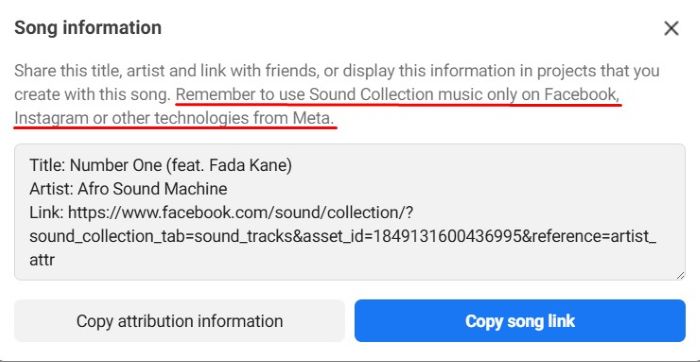
Creators hit limits when leaving Meta. A track that works for a Reel may fail on YouTube, TikTok, or websites. Policies differ by feature, account type, or region, leading to blocked uploads, muted sections, and extra editing costs during repurposing.
Royalty-free libraries sell portable licenses that spell out platforms, placements, and term. You download music, keep paperwork, and cut freely in your editor. The same license usually covers Instagram, YouTube, TikTok, websites, podcasts, and client deliverables without re-clearing every time.
Inside Meta, Sound Collection is fast. Creators browse, audition, and line up beats without leaving the app. Short, trend-ready cues help meet deadlines. For native-only campaigns, this convenience reduces tool switching, speeds approvals, and avoids separate contracts or payment flows.
Royalty-free wins for cross-platform work. One contract travels with the video, so teams export once and publish everywhere. Editors avoid re-edits and regional surprises. Clients receive files and proof they can use beyond Meta, keeping schedules intact and budgets predictable.
Fewer policy surprises when you monetize or boost
Sound Collection follows Meta’s monetization rules. Tracks are cleared for use inside Instagram and Facebook, including some ads, but eligibility depends on placement, account type, and feature. In-app prompts help you stay within policy while you assemble and publish creative.

Music coverage inside Meta can change as deals with rights holders update. A track that worked yesterday may lose coverage and trigger a mute or block, even on an existing post. You can replace audio to restore playback, but that still costs time mid-campaign.
Royalty-free licenses put rules in a contract. The document clearly names platforms, ad formats, territories, and term, so your rights don’t shift with an interface change or policy tweak. Organic, boosted, and paid placements share the same permission, which keeps schedules predictable.
Inside Meta, Sound Collection still simplifies compliance. The system flags restricted uses, suggests alternatives, and guides smaller teams through allowed surfaces. For quick, platform-only pushes, that handholding helps you publish safely without legal reviews, extra settings, or long back-and-forth.
Royalty-free stays steadier for monetization. Rights live in writing, not toggles. You can move the same cut from organic to ads without swapping tracks and carry it to other ad networks with confidence, because the permission travels with your files and paperwork.

Consistency across regions and account types
Sound Collection access can vary by account type, feature, and country. A creator profile may see tracks that a business page cannot. Availability changes. The same edit can behave differently depending on who posts and where they publish or location.
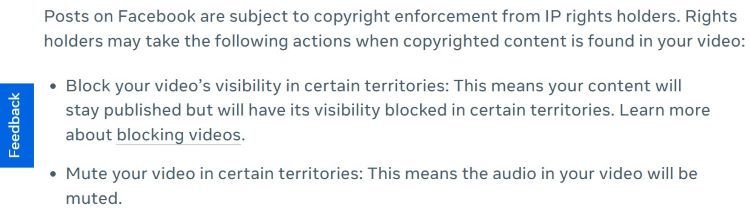
Creators face inconsistency when collaborating across markets. A track available for you might be missing for a partner abroad, causing mismatched edits, delayed approvals, or muted sections. Regional rules and account flags produce friction that complicates hand-offs and multiplies versions.
Royalty-free licenses define rights in the contract. You choose global or regional scope once, and the document applies regardless of interface changes. Editors, partners, and clients follow the same terms, so the music behaves predictably across countries, accounts, and features.
Inside Meta, Sound Collection still helps teams move quickly when everyone posts from the same region and account type. Shared access reduces confusion, and creators can duplicate working edits without shopping elsewhere for replacement tracks during tight timelines today too.
Royalty-free handles cross-border complexity better. One license travels with the files and covers collaborators, agencies, and client channels as defined. You avoid regional gaps, keep edits aligned, and prevent last-minute swaps that break continuity or introduce compliance risk repeatedly overall.
Safer omnichannel ad workflows
Sound Collection is designed for Meta placements. You assemble a cut for Reels, Stories, or Feed and publish inside Instagram or Facebook. Some ad formats are supported, but usage stays tied to Meta’s environment rather than ad networks and partners.

Creators run into friction when campaigns expand. A cut approved for Meta might need new music for YouTube Ads, TikTok Spark, or DOOH. Teams rebuild audio, re-mix levels, and retime edits, burning hours and risking mismatches between versions across channels.
Royalty-free licenses allow one music bed to travel across networks. You cut once, export variants, and traffic the same soundtrack to Meta Ads, YouTube Ads, TikTok, CTV, and displays. The contract’s scope keeps placements aligned without extra approvals each time.
Meta’s built-in catalog helps when you only need platform ads. In-app prompts steer you away from restricted placements, saving smaller teams from policy mistakes. For a Meta-only push, that guidance speeds delivery and reduces the need for additional tools significantly.
Royalty-free is better for omnichannel buys. One licensed track underpins creative everywhere, so media plans can shift without re-editing audio. You protect consistency, simplify trafficking, and compare performance apples to apples because the soundtrack remains constant across placements over time.
Better fit for client work and hand-offs
Sound Collection lives inside Meta accounts. When you deliver files to a client, there is no external license to transfer. The permission ties to posting within Instagram or Facebook, so rights cannot easily move with the project during hand-offs later.
Creators struggle when clients want the same cut on YouTube, websites, or ads managed by another team. Without portable documents, the client’s legal department may often block use. Editors scramble for replacement tracks, breaking timing, mood, and continuity across deliverables.
Royalty-free libraries let you name the client or project on the license. You include the invoice, terms, and license ID in the delivery folder. Whoever holds the files also holds proof, so reuse stays clean across platforms and partners clearly.
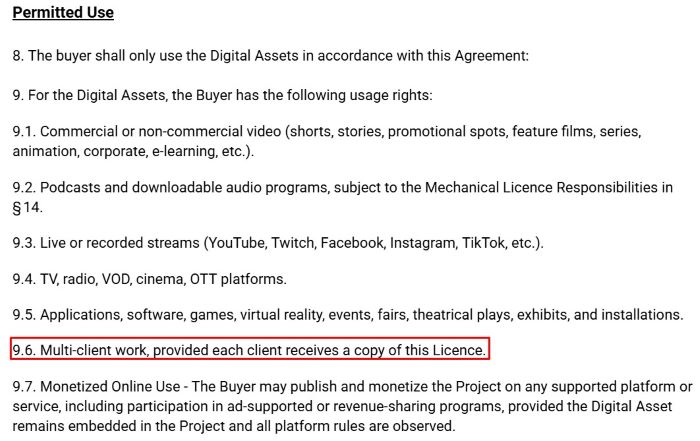
Within Meta, Sound Collection suits quick, internal workflows. Small businesses publish directly without managing contracts, and creators avoid extra coordination entirely. For single-channel campaigns, that simplicity keeps production moving and reduces questions during approvals or routine content updates and confusion.
Royalty-free wins for client work. The license travels with the deliverables, supporting agency transitions, partner channels, and owned media portfolios. Legal sign-off is faster, reuse stays consistent, and teams avoid re-editing music every time publishing responsibilities change significantly over time.
Stable catalog + stems/alt mixes
Sound Collection focuses on ready-to-use cues for in-app editing. You typically get a single stereo file per track. The catalog prioritizes short, trend-friendly cuts for Reels and Stories rather than multi-version deliverables like stems, instrumentals, or timed advertising cutdowns today.
Creators miss flexibility when they need alternate mixes. Without stems, you cannot easily duck a melody under voiceover or swap endings for tags. Testing variations becomes slower, and editors may replace music entirely to support dialogue, branding, or format changes.
Royalty-free libraries often ship stems, instrumentals, underscores, loops, and 15/30/60-second versions. Editors build VO-friendly beds, match cutdowns, and customize structure without losing the hook. Those deliverables shorten iteration, reduce session rebuilds, and keep creative intent intact across formats widely consistently.

For fast, native edits, Sound Collection helps. You grab a cue that fits the beat and publish. When timelines are tight and dialogue minimal, a single stereo track may be enough to deliver a clear, engaging post without extra effort.
Royalty-free is better for production control. Stems let you keep vocals out of dialogue, tighten intros, and align endings with supers. Alt mixes maintain the same motif while adapting intensity, so campaigns sound consistent across markets, languages, and placements worldwide.
Future-proofing content reuse
Sound Collection works best for content that remains inside Meta. When you need to reuse footage months on other platforms, the in-app track travels poorly. Replacement edits consume time, and your archive loses value because rights do not accompany files.
Creators face headaches when old posts regain momentum. A successful reel cannot become a website hero video without new music. Teams re-cut, re-mix, and re-export, introducing version drift and costs. Evergreen pieces suffer because audio cannot legally follow distribution elsewhere.
Royalty-free licenses cover long-term use across placements. You store the invoice and license ID with masters, then refresh cuts, subtitles, and formats as needed. The music bed returns for compilations, case studies, and ads without rewriting terms or seeking approval.

Within Meta, Sound Collection still accelerates day-to-day publishing. You move quickly, test ideas, and keep campaigns active with minimal overhead always. For ephemeral content, that is often enough. Short shelf lives reduce the need for archival reuse beyond the platform.
Royalty-free is better for longevity. The license travels with your archive, so editors can revive footage, localize content, and rerun campaigns confidently. Music remains consistent across versions, and teams avoid scrambling for substitutes when new opportunities appear months later everywhere.
How to choose the right royalty-free license for Instagram
Choose a license that states platforms, paid placements, and term in plain language. Name Instagram, YouTube, TikTok, websites, and ads explicitly. Define start and end dates, renewal options, and territory. Clear words prevent confusion and give editors confidence to publish.
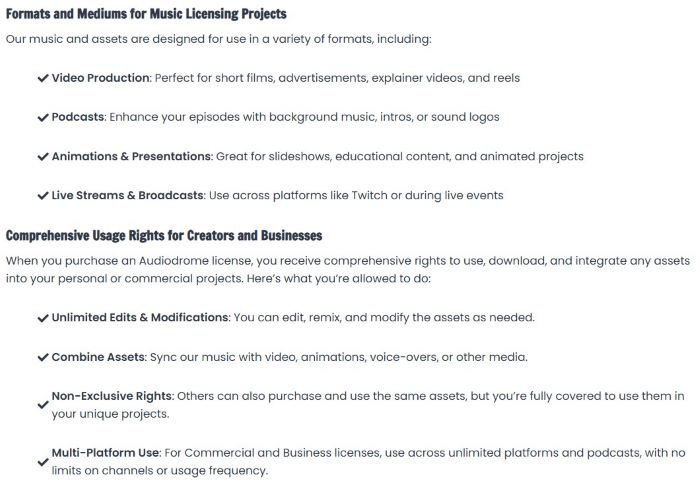
Confirm that advertising sits inside scope. The license should permit organic posts, Boosted posts, and Ads Manager campaigns. Include sponsored posts, branded content tools, and allowlisting. If you plan Spark Ads or remixes, list them explicitly, so buying stays clean.
Check whether rights attach to a brand, channel, or project. Write those identifiers into the brief, filenames, and export notes. If the client changes agencies or channels, everyone can prove eligibility. Clarity reduces disputes and keeps approvals moving during hand-offs.
Choose editor-friendly deliverables: stems for dialogue, cutdowns for Reels, and loopable sections. Save the invoice PDF, license ID, licensor, track URL, and permitted uses with your master export. Approvals, renewals, and appeals move faster because proof sits alongside your files.
Common mistakes that cause mutes and takedowns
Teams post with a track cleared only for Reels, then hit Boost and trigger a gate. The license never covered advertising. Editors scramble, swap music, and rebuild timing. Avoid mess by licensing for ads and organic use from the start.
When platforms ask for proof, nobody finds the invoice, license ID, or terms. Slack threads vanish, and emails mislead. Editors stall, deadlines slip, and budgets creep. Keep documents with the master export so anyone can answer claims, close reviews quickly.
Late in the timeline, an editor swaps track and forgets to update deliverables. Export ships with outdated license details, so platforms reject proof. Producers scramble, reconciling versions. Build a checklist and refresh the proof pack whenever music or duration changes.
Start with a cross-platform license, build a proof pack on day one, and keep it current. Each time you change music, length, or outputs, update the documents and exports. That routine prevents mutes, speeds appeals, and keeps campaigns on schedule.
Policies and agreements can shift without notice. relying on in-app tracks for evergreen or cross-platform edits risks sudden mutes. Save a clean export, and license a portable royalty-free track so replacements are quick and compliant when rights change mid-campaign later.








Proof pack you can copy and paste
Create a one-page proof pack for every edit and store it beside the master files. Put it in the folder and name it. When deadlines hit, anyone can open it, verify rights, and publish without digging through emails or chats. A license gives you paperwork you can save and show, and your agreement should clearly cover creators, brands, and agencies.
Include project name, brand, campaign, track title, licensor, license ID, permitted uses, platforms, term, and region. Add invoice link, track link, export hash, editor, and date. Paste the final post or ad URLs so reviewers can confirm publication quickly later.
With the proof pack in place, editors answer flags themselves. They attach a PDF, quote the license ID, and reference permitted uses. Legal checks terms on one page, not scattered messages. Turnaround shortens, because everyone sees the same current source.

Clients benefit next. The proof pack travels with the files, so they repost, localize, or boost without emails. Account changes do not stall campaigns. Store versioned copies in your DAM, and keep links active, so reuse stays simple across markets.



Audiodrome was created by professionals with deep roots in video marketing, product launches, and music production. After years of dealing with confusing licenses, inconsistent music quality, and copyright issues, we set out to build a platform that creators could actually trust.
Every piece of content we publish is based on real-world experience, industry insights, and a commitment to helping creators make smart, confident decisions about music licensing.


