
Facebook Music Copyright Rules for Reels, Stories, Live, and Ads

Facebook can mute your audio, block playback, limit reach, or divert revenue when it detects music, and the outcome depends on format, region, and account type. This guide outlines safe workflows for Reels, Stories, long videos, Live, and ads, as well as what to do when a post is flagged. You will also learn which “safe” myths fail and what proof to keep.


What enforcement looks like on Facebook
Facebook uses automated systems and policy checks to decide what happens when your video contains music.
Outcomes you will see
If Facebook detects music, it can mute sections, block playback, limit distribution, or divert revenue to the song’s rights holders. Outcomes depend on track ownership, regional rights, and specifically how you used music in context.
Facebook doesn’t issue YouTube-style strikes. Instead, repeated problems degrade your Page Quality rating. A lower rating reduces reach, restricts features, and jeopardizes monetization. Fix issues quickly and avoid patterns that signal repeated misuse of music.

A copyright claim redirects revenue to rights holders and keeps the video online. A removal blocks access. A policy violation impacts distribution or account standing. Review notices carefully and respond with proof, edits, or licensing.
How detection works in practice
Facebook uses audio fingerprinting to compare your soundtrack with files supplied by labels, publishers, and libraries. The system can match short snippets, pitch-shifted clips, or background uses, based on catalog coverage and rights-holder confidence thresholds.
Facebook expects videos to prioritize visuals, not unlicensed full-track playback. Signals include speaking over the music, showing on-camera activity, and adding background layers. Visual-first context reduces risk, while music-as-the-main-event increases scrutiny and flags.

Long, uninterrupted songs give the system a fingerprint to match. Loops, fades, commentary, and cuts make identification harder, not impossible. Continuous playback looks like music listening, not video storytelling, which escalates enforcement and hits distribution.
When revenue share applies
Facebook offers revenue sharing on eligible Page videos that use songs from catalogs available through Facebook’s music features. Follow the format rules and regional availability. Personal profiles, private posts, and cross-posted clips often don’t qualify.
Facebook splits revenue between rights holders and eligible creators. You lose eligibility if the video uses nonparticipating tracks, violates Meta music guidelines, relies on static audio, includes sensitive content, or runs in territories without coverage or monetization.

Reels and Stories use different licensing pools and monetization rules than long-form videos. Music stickers cover personal use, not branded content or ads. Short formats favor sound discovery, changing how claims, sharing, and eligibility apply.
How to add music on Facebook without triggering copyright flags (Reels, Stories, and videos)
Small workflow choices decide whether your post ships clean or turns into a mute, a block, or a revenue diversion later.
Choose the right workflow first: in-app music vs externally edited audio
Use Facebook’s in-app music tools when you want the lowest-friction path for Reels and Stories and you can live with the available catalog. In-app audio keeps your workflow inside Meta’s licensed features, so you reduce surprises after publish. Use externally edited audio only when you need a specific track for a brand, a client, or an ad and you can back it with clear licensing proof.
%201.jpg)
Think in tiers before you edit. The in-app picker sits at the low-risk end because it comes from Meta’s features and catalog rules. Sound Collection stays close behind for stable, repeatable background music, while licensed royalty-free works when the license names Facebook and covers your exact use. A commercial song pulled from a streaming platform sits at the high-risk end because it almost never includes rights for public video use.
Reels: the safest way to use music
Start your Reel in the editor and add music through the audio picker or Sound Collection, then build your cuts around that choice. This keeps the music inside the workflow Meta expects for short-form video, which helps you avoid instant blocks that follow baked-in commercial tracks. When you upload a Reel with a full song already mixed into the file, you invite a match that can mute your audio fast.
%203.jpg)
Edit for a visual-first result so your Reel reads like a video, not a listening session. Put your voice, captions, on-camera action, or strong motion on top of the music so the soundtrack supports the story. Use quick cuts, transitions, and scene changes to keep momentum, then keep music under your primary message instead of letting it lead.
When the audio you want disappears or shows as unavailable, pick a safer substitute and keep the concept intact. Business Pages face tighter catalog access, so plan a fallback track that matches tempo and mood instead of chasing the same trending song. Sound Collection gives you a stable option for brand work, and licensed royalty-free music gives you control when you need the same track across Pages, regions, and campaigns.
%205.jpg)
Stories: what works, what gets limited, and how to keep it clean
Add music inside the Story editor when you want the simplest path, and you can work with the available tracks. This keeps your Story aligned with the platform’s music features and reduces the odds of a post going silent after publish. If you add music in another editor and upload the finished file, you carry more risk because the system evaluates the audio as part of the upload.
%206.jpg)
Keep Story music short, light, and clearly tied to what viewers see on screen. A quick background moment under speech, movement, or text reads like a Story, while a full track paired with a static visual reads like music-first content. Use the music as seasoning, then let the visual do the heavy lifting so your Story stays stable.
Even with the right workflow, Stories can still go silent for reasons outside your edit. Region settings change what catalogs Meta can show, and account type affects what tracks appear in the picker. Catalog availability also shifts over time, so build a habit of checking the music sticker options right before you publish.
Regular Facebook videos: upload choices that affect claims and revenue
Pick one of three clean paths before you export. You can publish with no music when voice and visuals carry the message, which keeps the risk low. You can use Sound Collection or licensed royalty-free tracks when you want predictable background coverage and proof you can show later. You can also use eligible catalog music for revenue sharing in cases where Facebook offers that option for your Page and format.
%208.jpg)
Avoid upload patterns that look like a music stream. A static image with a full-length song gives matching systems an easy target and signals music-first intent. Long uninterrupted sections and playlist-style edits create the same problem, even when you add a logo or a caption. Build real scenes, add narration, and keep the soundtrack supporting the video.
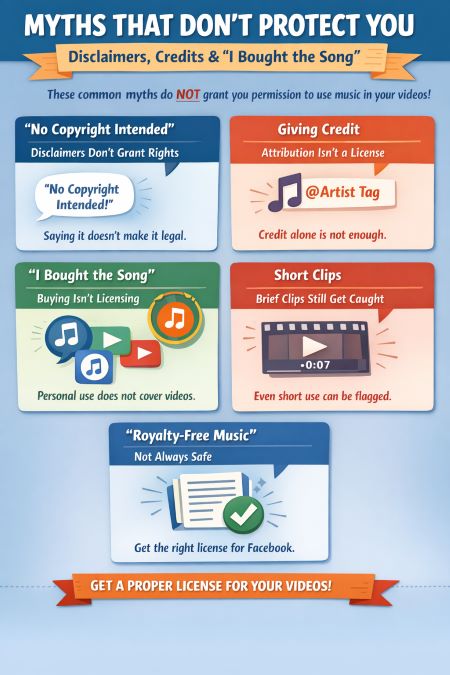
Myths that don’t protect you: disclaimers, credits, and “I bought the song”
A caption like “No copyright intended” or “I don’t own the rights” does not grant permission to use a song in your video. A disclaimer does not create a license, so it cannot change what you are allowed to upload or monetize. Facebook reviews ownership and platform permissions, so intent and good faith do not change the outcome.
Giving credit helps viewers, but it does not clear rights. Attribution tells people who made the music, while a license gives you written permission to sync that music to video and publish it on Facebook. Tagging the artist also does not clear the publisher side of the song, so a claim can still appear even when you credit properly.
Buying a track or paying for Spotify or Apple Music covers personal listening, not video publishing. The moment you sync music to a public post, you step into a different set of permissions that consumer access does not include. If you plan to monetize, boost, or run an ad, you need a license that explicitly covers that use on Facebook.
A short clip can lower risk in practice, but it does not create permission. Automated matching can still identify short sections, especially when the audio stays clean and uninterrupted. When the system finds a match, your video can lose sound, distribution, or revenue even if the music only plays for a few seconds.
“Royalty-free” only helps when the license matches your real use case. Look for clear language that names Facebook, allows commercial use when needed, and states territory and term so you know where and how long you have coverage. Save proof as you buy, including the invoice, the license PDF, and simple project notes that tie the track to the post.
Pre-publish audit for music
Running a quick audit before posting helps prevent claims, mutes, and wasted campaign spend.
Five checks before posting

Pre-Publish Music Checklist (Facebook)
- I checked Creator Studio monetization status first; “clean” means I can publish, while warnings mean I should read the issue before posting.
- I verified the audio source: Sound Collection, a royalty-free license that names Facebook, or original music with clear rights and proof.
- I kept the edit visual-first: motion, speaking, captions, or clear on-screen activity in every segment so music supports the story.
- I matched format to the rules: Reels use in-app audio or Sound Collection, long videos may revenue-share, and Live needs strict limits.
- For business Pages, I confirmed which tracks are available for my account and region, then aligned choices with the campaign calendar.
Proof pack and naming conventions
Save all license documentation in a dedicated folder mapped to post IDs. Each project should have its proof pack ready, so if claims appear you can respond quickly with organized supporting evidence.

Include the track’s name, version, length, and usage notes in your files. Clear labeling avoids confusion when multiple edits exist, ensures accuracy in appeals, and helps future campaigns reuse the same approved music safely.
Maintain a shared spreadsheet for your team or clients. Record license details, track usage, and related post IDs. This central reference improves accountability, streamlines approvals, and avoids mistakes when campaigns scale across multiple accounts.
Facebook Music Copyright Checker
The Facebook Music Copyright Checker gives you a quick way to test your content before you publish. It estimates claim risk, explains why, and offers simple fixes or an appeal draft. You save time, protect reach, and avoid last-minute surprises.
This checker is for educational use only. It cannot guarantee claim outcomes or override Meta’s systems. Always confirm rights, store your proof, and treat the Professional Dashboard as the single source of truth.
Facebook Music Copyright Checker
Estimate claim risk and get fixes before you publish. Focused on music usage (not PMP/CMP). Always confirm in Professional Dashboard → Monetization.
Your Risk on Facebook
Embed This Tool on Your Website

Safe audio sourcing for monetized content
To monetize on Facebook and Instagram without takedowns or muted segments, music licensing compliance across platforms is critical.
Meta Sound Collection
The lowest copyright risk for both Facebook and Instagram comes from Meta’s free Sound Collection. Tracks come pre-cleared for platform use, so you avoid claims, policy violations, and disputes that usually follow when using commercial songs.

Choose Sound Collection over trending tracks whenever you need long-term safety. Trending music feels appealing but often leads to muted sections, limited monetization, or blocks once licensing windows close. Sound Collection remains stable across updates and policies.
Streamline your workflow by previewing and auditioning tracks within Creator Studio. Tag selections inside your content calendar, then replace placeholders quickly before publishing. This approach helps you test pacing, mood, and audience fit without risking claims.
Licensed royalty-free tracks
A royalty-free license only works if it explicitly names Facebook and Instagram as covered platforms. Many older or generic licenses stop at “online video” and won’t protect against claims inside Meta’s specific monetization system.
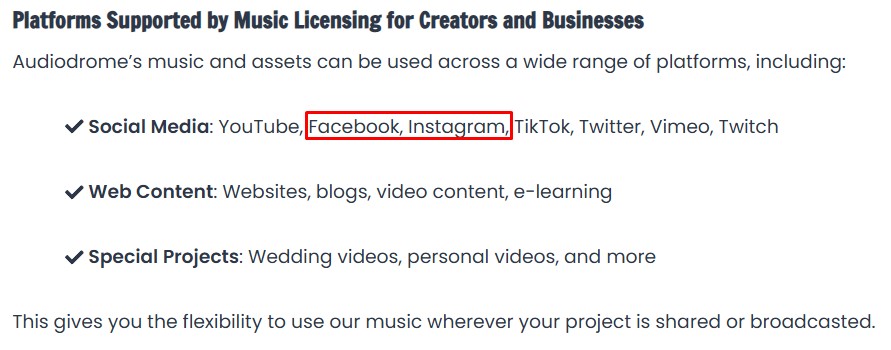
Always save proof of purchase. Download the PDF license or invoice from your provider and archive it alongside the project files. If challenged, you can submit documentation through Facebook’s dispute process to clear the claim quickly.
Red flags include licenses that use vague language like “internet use” without platform lists, or omit commercial coverage entirely. Avoid libraries that fail to show platform scope, territorial limits, or ad usage rights in their terms.
Original or commissioned music
If you create or commission music, make sure you own both the master recording and the composition rights, or have signed written permission from the composer. Ownership ensures full control when publishing across Meta’s ecosystem.
Owning rights lets you reuse the track across multiple Pages, client projects, and even paid ad campaigns. This flexibility avoids repeated licensing costs and provides consistent brand identity across different placements and formats.
Ask your producer for stems, loops, intros, and outros. Breaking a track into flexible elements lets you adapt tone, duration, and emphasis while keeping brand sound consistent across short Reels, long videos, and ads.
Covers, remixes, and public domain
Cover songs always trigger composition rights, even if you record every instrument yourself. The underlying composition remains protected, meaning you still need permission from the publisher to monetize or distribute on Facebook or Instagram.
Remixes complicate things further. You need rights to the original composition and to the master recording you’ve remixed. Without clearance from both layers, your upload risks takedowns or revenue redirection under Meta’s copyright system.
Public domain compositions may be free to use, but recordings of those works often remain protected. Using a protected orchestra or label recording without clearance invites claims, even if the underlying composition itself is in the public domain.
Meta Sound Collection: how to find tracks and use them safely
Meta Sound Collection is a separate library of royalty-free tracks and sound effects built for commercial use across Meta platforms. It differs from the in-app music picker, which focuses on licensed catalog songs that can change by account type, region, and format. Sound Collection stays lower risk because Meta clears it for platform use, yet it still does not act as a blanket license for every off-platform project.

Search with your edit in mind so you pick audio that fits the cut instead of forcing the cut to fit the audio. Use filters like mood, genre, tempo, duration, and vocal versus instrumental to match the pacing of your visuals and the tone of your message. For short-form content, prioritize clean intros, simple transitions, and loop-friendly sections that sit under voice and captions without fighting attention.

When you use a Sound Collection track, add the required credit so your post stays compliant and your team keeps a clean record. Include the artist name and track title in your caption or post notes, then keep the same credit inside your project files for client handoffs and future edits. Save the track name, source link, date, and campaign or post ID, then name exports consistently so anyone can trace the audio choice in seconds.

“Free” music libraries and attribution licenses: what still gets you muted or blocked
When you use “free” music, it usually comes with conditions that matter the moment you publish on Facebook. Many libraries require attribution, and creators often forget it when they schedule posts, boost content, or ship files to a client. Pay attention to limits on monetization, platform coverage, territory, and term so you know what the license actually allows.

Free tracks can still trigger matches because other people upload the same audio everywhere. A third party can fingerprint a track, re-upload it with a different claim, or distribute it through a catalog that overlaps with yours. When a non-exclusive library feeds many channels, conflicting claims can happen even when you follow the stated rules.
“Copyright-free” is marketing language, so you still need enforceable rights in writing. Watch for vague terms like “internet use,” missing platform lists, and silence on ads and monetization. A usable license names Facebook, states commercial rights when needed, defines territory and term, and gives you documentation you can save with the project.
Format-specific rules that trip creators
Each format on Facebook has different music rules, and misunderstanding them often leads to muted sections, demonetization, or limited reach.
Reels
Reels only allow music added through the in-app picker or Meta’s Sound Collection. Uploading your own commercial track will trigger an instant block or mute, since the system only recognizes music licensed inside those features.
.jpg)
Reels edited around a song where music drives the timing or becomes the main focus are more likely to be muted or limited. Meta expects visuals and storytelling to lead, with music remaining a supporting element.
Business accounts face tighter catalog restrictions. Many trending tracks are unavailable for commercial Pages, reducing options and reach. Using restricted songs can shrink distribution, making content invisible to audiences even if the Reel technically stays online.
Regular videos
Regular Facebook videos support music revenue sharing when eligible tracks from approved catalogs are used. Rights holders claim part of the ad revenue, while creators keep the rest, provided the video meets format and policy conditions.
Meta requires specific format rules: music cannot dominate the video, visuals must remain primary, and placement must feel integrated. Uploading a static background with full-track playback signals music-first use and risks enforcement or reduced distribution.
Creators should verify music status before publishing by checking eligibility tools inside Creator Studio. These dashboard checks confirm if tracks allow monetization, revenue sharing, or limited use, helping avoid surprises after the video goes live.

Live streams
Live streaming carries the most complex music risks because Facebook monitors audio in real time and applies stricter enforcement, especially when you use background tracks. To minimize issues, keep any recorded music short and clearly secondary to your spoken content or activity. Long background tracks create an uninterrupted fingerprint that invites immediate muting or takedowns, and they weaken the educational or interactive focus Meta expects from live formats.

Turning live streams into listening sessions where music playback is the main event carries significant risk. These streams are often flagged as unlicensed performances, even if you credit artists or use purchased downloads. Meta’s policies view them as broadcasting music rather than creator-driven content, so expect muted segments, blocked streams, or loss of monetization.

Performing music live requires performance rights for the composition and streaming rights for the broadcast. Independent artists can clear their own work, but covering another artist’s song demands clearance from publishers and labels. Without both sets of rights, streams risk takedowns, limited reach, and account penalties that accumulate with repeat violations.
Business and brand account realities
Instagram applies different music rules to business and brand accounts, and ignoring those rules often leads to blocked campaigns or silent posts.
Why access looks limited
Meta restricts business account access to popular music catalogs to prevent misuse of commercial recordings. These limits reduce copyright risks, protect licensing deals, and keep creators from attaching brands to songs without proper clearance.
.jpg)
Access also varies across regions. Some territories support extended music features for businesses, while others restrict commercial use entirely. This patchwork reflects how Meta negotiates licenses locally, leaving brands with uneven creative options worldwide.
Forcing trending songs into business content often backfires. Workarounds such as editing music outside the app trigger detection, leading to muted ads, flagged posts, or limited reach. Brands lose credibility when campaigns disappear mid-flight.
Action plan for business accounts
Brands should build a reusable audio kit of intros, outros, and transitions. Having custom assets ready helps maintain identity across campaigns and avoids reliance on restricted trending tracks or short-term catalog access changes.
Business accounts function best when relying on Meta’s Sound Collection or licensed royalty-free tracks. These sources carry clear permissions for commercial use, giving brands predictable safety across posts, Reels, and ad placements.
Map every music choice to a campaign goal and review ad safety guidelines before publishing. Safe tracks prevent disruptions during product launches, sponsored collaborations, or paid campaigns, ensuring sound design supports strategy rather than creates risk.
Facebook music rules for ads and branded content
Money changes the rules because your post stops being personal publishing and becomes commercial use. Commercial use includes boosted posts, paid ads, sponsorships, and client deliverables, even when the creative looks like a normal Reel. Business Pages face tighter music access because Meta must limit how brands attach campaigns to commercial recordings without the right permissions.

Reels ads and boosted content fail when creators reuse the same music workflow they use for organic posts. A track that plays fine in a personal Reel can lose eligibility the moment you boost it, since ad placements demand clearer rights coverage. This mismatch shows up as rejected ads, muted audio, limited delivery, or sudden loss of monetization after launch.

Build paid campaigns on audio sources that hold up under review and scale. Sound Collection works well when the placement allows it, and original or commissioned music works when you control the master and the composition. Licensed royalty-free tracks also work when the license clearly covers ads on Facebook and Instagram. Trending catalog audio baked into edits creates the highest risk because you lose control and proof at the exact moment spend begins.

Your license must spell out ad use in plain terms so reviewers and clients can verify coverage quickly. Look for language that permits promotional or advertising use, defines the term and territory, and names Facebook and Instagram as covered platforms. Make sure the license also covers the correct brand or entity, since agencies often run campaigns across multiple Pages. Keep the invoice, license PDF, and a short usage note ready so you can hand proof to a client the same day.

Why your video gets muted even when you have permission
Sometimes you pay for the recording but miss the song rights behind it. The recording is the master, while the song itself is the composition, and each can have a different owner. When your proof covers only one layer, Facebook can still match the audio and divert revenue or mute sections because the other layer lacks clearance.
Licenses also fail when they sound broad but skip the exact use that Facebook evaluates. Words like “online video” do not always cover Facebook by name, and they often skip ads, boosting, or monetization rights. Your risk jumps the moment you boost a post or run a campaign, because paid distribution triggers stricter review and clearer proof requirements.

Territory gaps create another common surprise. The same track can work in one country and mute in another because rights change by region and Meta enforces availability based on local coverage. Rights holders can also update catalog terms over time, so a video that ran clean last month can start receiving limits when coverage shifts.
Even when you hold the right license, slow proof can cost you reach. Reviewers need to see the track title, licensor, license type, the platforms covered, and the dates and territory of coverage in one place. Keep a proof pack that matches your appeal fields, with the license PDF, invoice, and a short usage note tied to the post ID so you can respond in minutes.
Edits can create a final mismatch when your exported audio differs from what your paperwork describes. Pitch shifts, time-stretching, layered stems, and aggressive mixing can still match a fingerprint, while your proof references a clean original file name. Label versions with the exact track name, edit type, and timestamped export so your appeal points to the same audio Facebook detected.
Rapid response playbook for claims and mutes
Protecting distribution, revenue, and Page quality on Facebook often comes down to handling claims quickly.
Read the notice classify the issue
A mute affects only audio, a block removes access, limited distribution restricts reach, and monetization removal diverts revenue. Knowing the difference helps you understand severity before taking the next action.
Classifying the issue defines your choices. Blocks often demand edits or replacement, while revenue diversion may only require proof of license. Understanding the system prevents wasted time and avoids unnecessary escalations or disputes.


Replace audio fast path
Facebook’s in-app Replace Audio tool offers the fastest solution. This feature isn’t available on computers, but it is available on Android or iPhone. It swaps tracks without losing engagement metrics or video history, making it a useful first response when music triggers claims or mutes unexpectedly.
.jpg)
Choose a replacement track with similar tempo and mood from Sound Collection. Matching pacing helps preserve your edit’s rhythm while ensuring licensing coverage, preventing future interruptions that limit visibility or monetization.
When possible, keep your original captions, thumbnails, and publishing time intact. Preserving these assets protects search performance, maintains scheduled rollout impact, and ensures campaigns remain consistent even after audio changes behind the scenes.
Appeal with proof when licensed
Appeal by attaching your license PDF or invoice. Include the track title, licensor name, platforms covered, and your Page or entity. Clear documentation helps reviewers confirm rights quickly and restore monetization.
Add a concise rights statement that matches the detected content. For example: “We hold a commercial license for [track title] covering Facebook and Instagram.” A single accurate sentence reduces confusion and accelerates resolution.

Monitor your appeal status through Creator Studio or Facebook Rights Manager. Use the dashboard to track case progress, upload additional evidence if requested, and confirm when revenue or distribution access returns to normal.
Counter notice scenarios
File a DMCA counter notice only when you hold clear rights and the claim remains wrong. This step requires confidence, since the process is legal and pushes the dispute outside Facebook’s systems.
.jpg)
Counter notices involve legal risk. You must provide personal details, formal declarations, and accept liability if your claim proves invalid. Without airtight documentation, pursuing this path often creates more problems than it solves.
A faster alternative is removing or replacing the audio. Restoring reach and revenue quickly often matters more than fighting ownership claims. Use this path if you lack resources for extended legal action.
Leave up or delete decision
If the content remains visible and only revenue is redirected, leaving it live may be worthwhile. You preserve engagement data, watch time, and audience momentum, while separately pursuing appeal or license verification.
When audio forms the backbone of your post, unpublishing and reuploading with compliant music makes sense. This choice sacrifices original metrics but ensures long-term visibility, brand safety, and freedom from repeated claim escalations.
Deleting or unpublishing resets distribution signals and erases watch history. Use this option cautiously, since algorithms reward continuity. Only replace entirely if leaving the post live causes reputational harm or ongoing policy violations.
Identify label
Muted • Blocked • Limited distribution • Monetization removed. Classification defines severity and your next move.

Fast path
Use Replace Audio in-app → pick a Sound Collection track that matches tempo and mood to restore reach quickly.
If licensed
File a short appeal with proof (license PDF, invoice, platforms covered). Keep the post live if allowed during review.
If formal takedown
Consider counter-notice only if you are certain of rights. Otherwise swap audio to restore distribution safely.
Track outcome
Log the ticket status in your dashboard and update your spreadsheet. Tracking avoids repeats and improves future dispute speed.
Client and team workflows that prevent repeats
Building structured workflows keeps teams and clients from repeating mistakes that cause claims, blocks, or wasted ad spend.
Intake checklist
Every new project should start with an intake checklist capturing the Page or entity name, platforms involved, target territories, and formats. This prevents misalignment later when distributing content across multiple accounts and regions.
Define a music source selection policy and require sign-off. Confirm that tracks come from Sound Collection, licensed royalty free libraries, or custom work. An agreement up front reduces disputes and ensures every stakeholder understands platform limitations.
Include delivery timelines and appeal contacts in the intake. Assign someone responsible for handling notices if claims appear. Having a contact speeds resolution and avoids stalled campaigns or missed publishing deadlines.
Edit and export standards
Set loudness targets that leave headroom for voice-over. Aim for balanced mixes where narration cuts through music without distortion. Overly loud tracks raise red flags and can make speech unintelligible, hurting both compliance and audience retention.
Export stem-based versions of projects so individual elements like vocals, beats, or pads can be swapped quickly. If a track triggers enforcement, editors can replace one stem without rebuilding the entire project timeline.
Tag each version clearly as Reel, long-form, or Live. This prevents teams from mistakenly uploading the wrong cut. Format-specific tags help identify which export aligns with eligibility requirements and avoids mismatched claims across accounts.
Multi page and client transfer
When licenses allow, add the client’s entity name to license notes. This small step strengthens appeals by showing explicit coverage, reducing doubt from reviewers when music is used across multiple branded Pages.
Always store proof alongside project files. Keeping invoices, license PDFs, and correspondence in the same folder avoids scrambling during disputes. Organized documentation shortens appeal time and demonstrates professional standards to clients.
Prepare a handover packet containing the proof pack and usage summary. Delivering this to the client ensures continuity, safeguards against future disputes, and positions your team as a trusted, compliant partner.
FAQs
These are the real questions creators and brands ask after a mute, a removal, or an ad rejection, with the shortest path back to a clean publish.
Why did Facebook mute my Story even though I used the in-app music option?
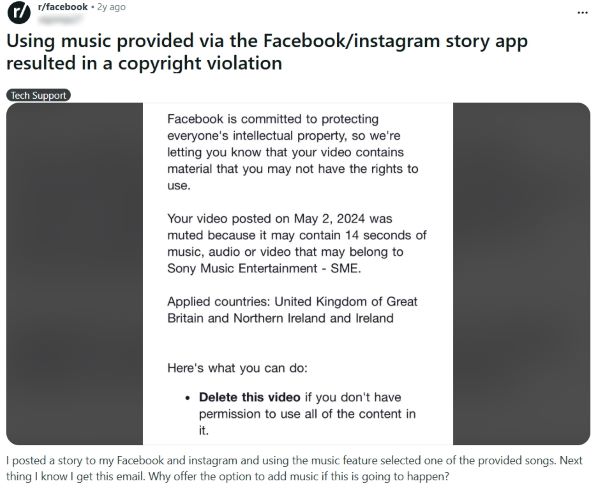
Facebook licenses in-app songs under changing rights windows, and availability varies by country, account type, and format, so a track can clear at publish and later lose coverage in specific regions. Meta also expects a visual-first Story because music-forward posts trigger stricter enforcement signals. When rights shift, Meta can restore or re-limit content based on updated coverage.
Facebook muted my original song release. How do I fix it?
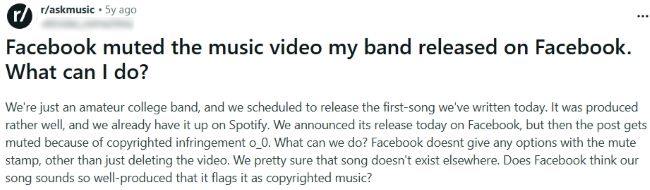
Start by checking whether a distributor, label partner, or third party registered your track into a matching system, because Facebook can match your audio and route it into a claim flow even when you wrote the music. Gather proof that ties the recording and the composition to you, then submit the dispute through the path shown in your notice or Rights Manager workflow. Keep your track metadata and release records aligned so reviewers can verify ownership fast.
Can brands use copyrighted music in Meta ads?
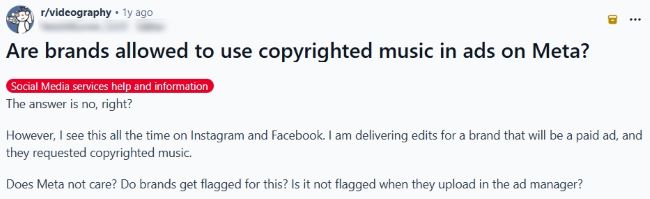
Brands run into stricter rules because ads count as commercial use, so you need explicit rights that cover paid distribution on Facebook and Instagram. Build campaigns on Sound Collection when the placement supports it, or use licensed royalty-free or custom music with clear ad rights and platform coverage. Meta’s music guidelines also reward a visual-first execution, which lowers enforcement risk during delivery.
Your safest next upload
Facebook music issues rarely come from bad intentions. They come from small workflow mistakes, weak proof, and audio choices that fail the moment you boost, monetize, or scale to clients. Keep your edits visual first, choose sources you can document, and store a tight proof pack for every post. When a flag appears, act fast and fix the root cause so it does not repeat.



Audiodrome was created by professionals with deep roots in video marketing, product launches, and music production. After years of dealing with confusing licenses, inconsistent music quality, and copyright issues, we set out to build a platform that creators could actually trust.
Every piece of content we publish is based on real-world experience, industry insights, and a commitment to helping creators make smart, confident decisions about music licensing.


