
Meta Sound Collection License Terms for Facebook – What Creators Ask

Audiodrome is a royalty-free music platform designed specifically for content creators who need affordable, high-quality background music for videos, podcasts, social media, and commercial projects. Unlike subscription-only services, Audiodrome offers both free tracks and simple one-time licensing with full commercial rights, including DMCA-safe use on YouTube, Instagram, and TikTok. All music is original, professionally produced, and PRO-free, ensuring zero copyright claims. It’s ideal for YouTubers, freelancers, marketers, and anyone looking for budget-friendly audio that’s safe to monetize.
Facebook music feels simple until you monetize, boost a post, or publish for a brand, since the “available” song list does not equal full rights. Meta Sound Collection covers Facebook and Instagram when you follow its Terms, while in-app licensed songs only cover specific uses and can vary by account and region. For predictable monetization, default to Sound Collection and save proof from the track listing and Terms page.

Meta Sound Collection license terms
Creators worry about Sound Collection because Meta shows music as “available” in the editor, yet the real permission lives in the terms and the posting context.
What is Facebook’s in-app music actually allowed to be used for?
%202.jpg)
Meta’s music tools include different catalogs with different permissions, and Meta’s rules focus on how you use the music. Meta’s Music Guidelines call out commercial and non-personal use as a separate category that requires appropriate licenses, which is why these Facebook music copyright rules drive mutes, limits, and eligibility changes. Sound Collection exists for creators and brands who want music cleared for use on Meta products, including commercial scenarios.
That difference explains the confusion. A song can appear in the editor and still carry limits that clash with ads, branded content, or reposting.
Are Meta Sound Collection tracks copyright-free, or can I still get a strike if I edit outside Facebook?

Meta separates “available in the editor” from “licensed for your use,” so the label matters more than the song list. Sound Collection gives you a royalty-free license to use its audio in content you create and share on Meta products. When you edit outside the app, the risk comes from where you publish, not from the edit itself.
This is where creators get surprised. They export one video and post it across platforms, then a match shows up on the repost. Use Sound Collection as your Meta-safe base, and use a separate cross-platform license when you plan to publish the same cut on YouTube or TikTok.
Do I need to credit the artist when I use Meta Sound Collection music?
%204.jpg)
Sound Collection Terms grant a royalty-free license to use Sound Collection audio on Meta products for commercial or non-commercial purposes. The Terms focus on permission and scope, so the key compliance step is using the audio inside Meta’s allowed boundaries. Credit can still help with transparency, yet the Terms do the real work of clearing your usage on Meta.
So center your advice on proof, not on captions. Save the track listing and keep a dated record of the Terms page you relied on. When a question comes up later, you can point to the exact source and the timing instead of relying on memory or a caption that never proves rights by itself.
Can I use Meta Sound Collection music on YouTube, TikTok, or LinkedIn?
%205.jpg)
Sound Collection Terms grant the license for use on Meta Company Products, which makes Facebook and Instagram the core covered destinations. That scope matters because off-platform publishing creates a separate rights context and a separate fingerprinting environment. If you need the same edit everywhere, you need a license that explicitly lists those platforms.
This is where creators lose time. They build one asset, reuse the audio, and then spend days untangling claims on the repost. Keep Sound Collection for Meta placements, and switch to a cross-platform royalty-free license for campaigns that require YouTube, TikTok, LinkedIn, and a website cut.
Will Facebook tell me if the music I’m about to use is copyright-free?
%203.jpg)
Facebook rarely uses the phrase “copyright-free” because copyright still exists even when you get a license. What you can look for is a clear permission signal, and Sound Collection provides that through its Terms and track listings. The safest workflow starts with picking audio from Sound Collection when you need predictable publishing on Facebook and Instagram.
From there, confirm the source before you post. Open the track listing, save the track name, and keep a screenshot that shows you pulled it from Sound Collection on that date. This simple habit gives you clean documentation when a system match or a monetization review questions your audio later.
How do I access the Facebook audio library and Sound Collection?
%206.jpg)
Meta hosts Sound Collection as a public library where you can browse tracks and sound effects, then download the files for your edits. Meta’s own business help guidance walks through the flow, including the Download step from Sound Collection. This matters because the download flow signals you are using the correct catalog, not a random in-editor suggestion.
Once you find it, build a repeatable routine. Choose the track, download it, save the listing screenshot, and store the link with your project files. That small setup makes future disputes easier because you can point to the exact Sound Collection source instead of arguing about whether a song “counted as free.”
Why do songs disappear from Facebook’s in-app music library over time?
%207.jpg)
Catalogs change because music rights run on contracts, territories, and product permissions, not on permanence. Meta’s guidelines and help materials describe licensing agreements as the reason access and availability vary. When a deal changes, a track can vanish from search, swap availability by region, or stop appearing for a Page.
This is why “I used it before” fails as a strategy. You want a workflow that survives catalog churn, especially for brands and recurring formats. Sound Collection gives you a clearer, documented permission layer for Meta publishing, and your saved proof bridges the gap when a track disappears from view later.
Monetization rules
Creators chase stable earnings, yet one music choice can change payouts from full monetization to revenue sharing or ineligibility without warning.
Can I earn money on Facebook when I use “royalty-free” music?

Yes, Meta supports monetization on eligible Reels that include royalty-free music from Facebook’s library. Meta’s business help page describes monetizing eligible Reels with licensed music and royalty-free music. The key is using audio that Meta flags as safe for earning money in that format.
This is why the label matters more than the song title. A track can show up in search and still route you into revenue sharing or limit earnings, depending on the tag. If monetization drives your plan, pick Sound Collection style royalty-free audio and keep the track page screenshot for your records.
What music can I use on Facebook Reels without losing monetization?

Start with audio that Meta labels royalty-free for Reels, since Meta describes that category as safe to use with earnings tied to content performance. Meta also lists licensed music as a separate category that can qualify for revenue sharing instead of full payout. Your safest default comes from Sound Collection and royalty-free tags.
Then match the music choice to your goal. If you want predictable earnings, use royalty-free audio. If you want a specific popular track, expect revenue-sharing rules and eligibility gates tied to that licensed song. Either way, open the track details before publishing and save the listing proof.
Will Facebook demonetize my Reel if the music lacks a “royalty-free” label?

Meta separates licensed music from royalty-free music in its monetization guidance, and those categories lead to different outcomes. Licensed music can qualify for revenue sharing on eligible videos, while royalty-free audio supports earnings tied to performance. When you use music that lacks a royalty-free label, you often enter licensed rules.
That shift explains sudden drops in payout expectations. The editor can show a song as available while monetization tools apply a different rule set to that track. If you want to avoid surprises, choose royalty-free labels for Reels you monetize, then keep a screenshot of the track page and label.
What does “revenue sharing” mean on Facebook videos with licensed music?

Revenue sharing means Meta keeps the video monetized and routes part of the ad revenue to the music rights owner. Meta describes this as a way for creators to earn with licensed songs inside eligible videos. Meta also states that creators receive 20% revenue share on eligible videos.
Think of it as a built-in deal attached to certain tracks. You get permission to use the song inside the program rules, and the music owner gets paid from the same video. If you want clean, predictable payouts, choose royalty-free audio that Meta marks as safe for earning money.
Why does Facebook share my ad revenue with music rights owners?

Facebook runs Music Revenue Sharing for eligible videos that use licensed music, so Meta splits the in-stream ad revenue between you, the rights holder, and Meta. Meta states that creators receive 20% on eligible videos. This usually appears after you use a licensed track that qualifies for revenue sharing.
Start by checking which music label you used inside the editor, since the label drives the payout outcome. When you pick licensed music, you trade a cut of earnings for permission to use that track in eligible videos. When you pick royalty-free audio, you aim for full earnings tied to content performance instead of a split.
Why do I see “revenue sharing” notices even when the music came from Meta Audio Library?

Meta’s music tools include more than one permission model, so “came from Meta” does not equal “full earnings.” Some tracks sit under licensed terms that trigger revenue sharing on eligible videos. Meta documents a licensed music path and a royalty-free path for earning money on Reels.
Focus on the label and the program status shown in your monetization surfaces. Revenue sharing usually signals a payout split, while a policy or eligibility issue points to a separate review track. When you want full control, default to audio Meta labels as royalty-free for monetization, then save proof of the track listing.
Why do I see monetization details missing, or no clear split percentage?

Meta publishes the headline split for Music Revenue Sharing, and Meta states that creators receive 20% on eligible videos, with separate shares for rights holders and Meta. UI details can vary by account, country, and program status, so the dashboard can show a limited breakdown for a specific track. Start with program eligibility and track label first.
When the interface hides the split for a song, you still control the outcome by changing the audio choice. Swap to royalty-free audio when you want earnings tied to performance. Use licensed music only when the track value outweighs the payout reduction, and document the track label before you publish.
Commercial use, business accounts, ads, and branded content
Creators get stuck here because business use adds stricter licensing rules, and Meta’s music availability often changes once money, clients, or promotions enter the picture.
Why does the Stories music library show so few tracks on a Page?

Pages and business contexts often expose a smaller music catalog because Meta’s licensed music library targets personal, non-commercial use. Meta’s help documentation explains that these music agreements exist to protect rights holders, which shapes availability by account type and context. That is why a personal profile can surface songs that a Page cannot access inside Stories.
Catalog size also shifts as Meta renews deals, changes regions, and updates product rules. Songs appear, disappear, or move between surfaces, which makes “I used it last month” a weak planning strategy for a brand calendar. If you need consistency for business publishing, build around Sound Collection and keep proof of the track page.
Why does a Business Page have trouble saving or using Reel audio?

A Business Page sits closer to commercial publishing, so Meta applies different music access rules and feature availability. The same Reel audio can show up on a personal profile while the Page interface limits reuse options, especially when the audio links to licensed catalog music. This mismatch often looks like a glitch, yet it usually reflects licensing scope and product policy.
When a Page workflow requires reusable audio, plan around sources that align with business use. Sound Collection supports downloads for editing and use on Meta products, which fits Page workflows better than relying on trending snippets. This approach also simplifies approvals because you can show the terms and the exact track listing to a client.
Can brands use copyrighted music in Meta ads without getting flagged?

Meta draws a clear line between personal posting and commercial use, which includes ads and boosted content. Meta’s Music Guidelines place commercial use under stricter permission rules, so a trending song inside the app rarely equals ad clearance, and music licensing becomes the deciding factor for ads, boosted posts, and client work. Sound Collection exists as the Meta-native option that supports commercial use inside Meta products.
Ads can run for a while and still face enforcement later because rights checks depend on the match, the territory, and the rights holder’s settings. A clean preview inside Ads Manager does not guarantee long-term clearance across placements. When a campaign matters, pick Sound Collection or secure a direct license from the rights holder for ad use.
Why do some Meta ads run for weeks with copyrighted music?

Enforcement timing varies because rights management depends on matches, reports, and rights holder settings, plus placements and regions. Meta’s rules still put commercial use under the “appropriate rights” requirement, even when an ad spends for days without a visible issue. A campaign that escapes detection today can still get limited, muted, or rejected later.
Think of “it ran” as an observation, not a permission signal. Clients care about stability, so build campaigns on music sources that explicitly cover ads on Meta. Sound Collection terms grant a royalty-free license for commercial use in content you publish on Meta products, which makes it a safer default for ads.
Why can a paid partnership lose earnings even when Meta shows “no violations”?

A paid partnership changes the context into branded content and commercial use, so monetization outcomes can shift even without a policy strike message. Music often drives that shift because commercial publishing requires the right licenses, and Meta’s guidelines place that responsibility on the publisher. The dashboard can show “no violations” while monetization systems still mark the post ineligible for earnings.
Handle paid partnerships like client work with a documented music plan. Use Sound Collection for Meta placements when you need Meta-cleared commercial music, or secure a direct license that names ads, branded content, and the exact platforms.
Muted, claimed, demonetized – what to do?
Creators panic after a mute or claim because speed matters, and the right fix depends on the music source, the publishing surface, and the action Meta expects inside the dashboard.
Why does Facebook’s own music library still get creators in trouble?
%208.jpg)
Meta provides music tools, yet Meta’s own guidelines say you remain responsible for using music with the appropriate licenses, especially in commercial or non-personal contexts. That means availability inside the app does not equal permission for every format, placement, or monetization setting. Rights holders can also limit use by territory, which creates partial mutes and revenue changes.
Plan around what Meta documents, not around what you see in search. Use Sound Collection for business and monetized workflows when you need rights-cleared audio for Meta placements. Then keep a short proof pack for every post, since proof speeds up disputes and reduces back and forth when a match appears.
Why did my business Page Reel get “partially muted” even with music from Meta Business Suite?
%202.jpg)
Meta’s Music Guidelines set stricter rules for commercial or non-personal use unless you have appropriate licenses. A business Page and Business Suite publishing often falls closer to a commercial context, so the same track can create limits even when it appears inside the tool. A partial mute usually points to territory or permission scope differences tied to that audio.
Start with the music source you used, then switch to a safer catalog for business publishing. Sound Collection exists as Meta’s downloadable library, and Meta positions it as rights-cleared audio for Reels and other Meta placements. After you replace the audio, rerun Copyright Check so you see the impact before you publish again.
Can 10-second music clips still trigger a copyright issue?
%201.jpg)
Yes, short clips can still match because Meta’s systems look for audio matches, not “full song” use. Meta does not publish a safe seconds rule you can rely on. When you build around clip length, you gamble on detection timing and rights holder settings.
Use a permission-first workflow instead. Pick Sound Collection when you want music cleared for use on Meta Company Products, then keep the track page as proof. When you need a popular track, assume it sits under licensed rules and plan for revenue sharing or limits based on the program rules.
Why did my video get “partially muted” even though I used music I believed was copyright-free?
%206.jpg)
“Copyright-free” rarely exists in practice because copyright attaches to recordings by default. Meta’s policies focus on whether you hold permission, not on whether a clip feels safe. A partial mute often shows up when a match hits a recording that lacks platform-specific clearance in the region where Meta applies the rule.
Move from assumption to documentation. Use a library that states its terms clearly for Meta publishing, then store the track link, the terms page, and your download date. When you use third-party music, keep the license file that names Facebook and Instagram, since Meta flags commercial and non-personal use without the right licenses.
Why do I get new copyright violations even when I use YouTube Audio Library, CapCut, or Sound Collection?
%204.jpg)
Each library comes with its own permissions, and those permissions rarely align across platforms by default. Meta’s Music Guidelines put the responsibility on the publisher to hold the appropriate licenses for the specific use. A license that covers one platform does not automatically cover Facebook and Instagram publishing.
A mismatch can also come from the exact recording you used. Creators sometimes pick an allowed composition and still use a recording with separate rights, which triggers matches. Fix this by standardizing your workflow around one source per platform plan, then saving the proof that ties the track to the terms you relied on.
Facebook says the song owner earns the money, so how do I fix my earnings?
%205.jpg)
This message usually means your video sits under licensed music rules that route monetization away from you or into a split. Meta’s music rules separate commercial or non-personal use from personal use, and that difference affects what you can monetize. The fastest fix is an audio swap to a royalty-free option cleared for Meta publishing.
Start by checking the track label you used, then decide whether you want reach or payout control. If you want payout control, choose Sound Collection for Meta placements and keep the track listing screenshot. If you want a specific licensed song, plan around revenue-sharing mechanics and accept the payout trade.
Why did monetization flip after I used “royalty-free” music?
%207.jpg)
Eligibility can change when Meta evaluates the content again, when the track source differs from what you assumed, or when a rule applies to your account context. Meta’s Music Guidelines highlight that commercial or non-personal use requires appropriate licenses, and that rule changes outcomes for Pages and branded posting. A label inside the editor can also lead you into licensed paths that change earnings.
Handle flips with a repeatable reset. Open Copyright Check details to see the impact and the match context, then replace the audio with Sound Collection when you want a stable baseline for Meta publishing. Save the track listing proof so you can show what you used and when you used it if the system flags the video again.
How do I dispute a copyright claim as a Page admin when Help Center links fail?
%203.jpg)
Meta routes disputes through Meta Business Suite tools tied to the specific Reel or video, and the same in-product steps apply when you need to remove a copyright claim on Facebook.
Use the in-product path first, so Meta connects your dispute to the exact content and match. Gather your proof before you click through, including the track source, the license terms page, and your receipts when you used third-party music. If the issue expands into broader policy eligibility, use the monetization appeal flow inside Business Suite.
How do I fix “Application rejected” and Partner Monetization Policies issues?
%2010.jpg)
Meta ties content monetization to Partner Monetization Policies and related eligibility standards. Meta’s Business Help explains where to review the policy issues and how to request another review through the Monetization section of Meta Business Suite. This message points to a program approval status, not a single post-fix.
Start with the policy issues screen so you see the exact category Meta flags. Then clean up the inputs you control, including music licensing choices, reposting habits, and proof storage for licensed content. After you align your publishing with the rules, submit the appeal through Business Suite so Meta rechecks your eligibility.
Proof workflow (what to save every time)
Creators get anxious about music because one unclear permission can flip a Reel from clean to claimed, and the fastest fix depends on what proof you saved before publishing.
Why do my “royalty-free” Reels still get flagged?
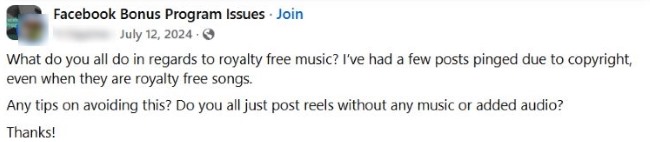
Meta separates personal sharing from commercial or non-personal publishing, and that line changes what music qualifies. Meta’s Music Guidelines say commercial or non-personal use requires appropriate licenses. A “royalty-free” label inside a tool can still collide with account type, format, and monetization context.
Build one simple rule that holds up. Use Sound Collection when you want a clear royalty-free license for Meta publishing, then save the track page and the date you pulled it. Meta publishes Sound Collection Terms and grants a royalty-free license for use on Meta products, so you can point to a primary source when a reviewer questions your audio.
How do I prove to Facebook that I used licensed or free-to-use music?

Meta gives you an in-product route to check claims before publishing and to dispute claims when you hold rights. Meta Business Help describes using Copyright Check in Meta Business Suite and filing a dispute through the tool. That flow works best when your proof ties directly to the track and the license terms.
Create a proof pack that matches what reviewers need. Save the track listing page, the terms page, the purchase receipt when you bought music, and the license file that names Facebook and Instagram usage. Then attach the proof through the Business Suite dispute flow and keep your language simple, since Meta’s process rewards clear documentation over long explanations.
How do I dispute a notice when I used my own original audio?

Meta allows disputes for demonetization caused by a match in several scenarios, and Meta Business Help explains dispute options for video and audio matches. When you record your own sound, you still want to show authorship and capture context, since matches can happen through similar recordings or overlapping reference files. Start inside Business Suite so the dispute attaches to the exact post.
Collect proof that shows creation, capture, and continuity. Save the raw clip file, export settings, and a short screen recording of your editing timeline that shows your source audio track.
Your safest music workflow going forward
If you want fewer surprises, decide first whether the post is personal, commercial, or cross-platform, then pick music that matches that scope. Use Sound Collection for Meta publishing, document the track and Terms each time, and switch to a cross-platform license when you repurpose content.



Audiodrome was created by professionals with deep roots in video marketing, product launches, and music production. After years of dealing with confusing licenses, inconsistent music quality, and copyright issues, we set out to build a platform that creators could actually trust.
Every piece of content we publish is based on real-world experience, industry insights, and a commitment to helping creators make smart, confident decisions about music licensing.


