
Facebook Music Rules for Monetization, Copyright, and Safe Use


Facebook music rules confuse creators, page owners, brands, and advertisers because they change based on how you post. A Reel for friends behaves differently than a Page video, and an ad behaves differently than an organic post with the same audio.
Facebook also blends several music “systems” into one experience. You can pick a trending track inside the app, upload your own soundtrack, or run licensed audio from a third party. Each route comes with different rights, detection, and enforcement outcomes.
This guide helps you sort your content into the right bucket, understand what Facebook checks behind the scenes, and choose the safest next step for your specific goal. You will also see where to go next in this cluster.


The three Facebook music questions people need to answer first
Start with three questions and your next step becomes obvious. These questions work for Reels, Stories, long videos, Lives, and ads. They also work for creators, agencies, and small brands publishing through Meta Business Suite.
First, confirm you can use the music on Facebook at all. That depends on where you sourced it and what rights came with it. In-app music, Sound Collection tracks, and third-party licensed music each carry different permissions and limitations.
Second, confirm if you plan to earn from that content. Meta has consolidated earning paths into Facebook Content Monetization, which it describes as a unified program that covers multiple formats. Meta announced the beta rollout in October 2024.
Third, plan for detection. Facebook can match audio against rights-holder references and apply actions like muting, blocking in some places, or limiting earnings. Meta’s ad standards also require you to secure the needed licenses when your ad uses music.
What changes on Facebook when content becomes commercial
Facebook draws a practical line between personal sharing and business activity. A personal profile posting for friends usually sits in a different risk zone than a Page publishing promotional content. This gap matters even when you use the same track.
Creator content and business content can look similar on screen, yet the rights expectations differ. Business publishing often includes brand messaging, product promotion, or client deliverables. Paid distribution also pushes your post into a more regulated use case.
Organic posts, boosted posts, and ads behave like three different categories. Boosting expands distribution through paid delivery, and ads run through Ads Manager pipelines. Meta’s ad standards make the requirement simple: secure the necessary licenses for music in ads.
Branded content and partnerships add another layer. When a sponsor sits behind a post, music rights need to cover promotional value , not only entertainment. That is also where copyright matches, muting, and revenue sharing show up more often, so it helps to understand how Facebook handles music copyright.

Quick comparison table
| Distribution type | Where it shows | Commercial signal | Music source that fits | Proof to keep | Common risk if you “wing it” |
|---|---|---|---|---|---|
| Organic post | Feed / Reels / Stories (unpaid) | Low to medium | In-app audio, Sound Collection, licensed royalty-free | License/receipt if licensed | Muting or match notice |
| Boosted post | Paid reach on an existing post | Medium to high | Sound Collection, licensed royalty-free, custom music | License/receipt + track link | Limited delivery or audio restriction |
| Ad | Ads Manager placements | High | Sound Collection (when available), licensed royalty-free, custom music | License/receipt + campaign name + proof folder | Rejection, takedown, revenue sharing |
How Facebook detects and restricts music use
Copyright infringement on Facebook usually means you used a recording or composition without permission, or your permission did not cover the way you distributed it. Even licensed music can trigger automated matches if the platform cannot confirm your rights fast.
Rights Manager is Meta’s matching system for audio, video, and images, built for rights holders to find and manage uses of their content. That matching can lead to actions that affect availability, audio playback, or earning status.
Videos get muted or partially blocked when the platform applies a policy action to matched audio. In practice, that can look like muted sound in specific regions or a limited audience, depending on rights-holder settings. The exact outcome depends on the match and policy. I cannot confirm every match outcome.
“Music rights match” outcomes usually mean the platform found a reference match and applied a rule. That can lead to a notice, an audio change requirement, or earning limits. The copyright mini-hub below breaks down what a match means and what to do next.
Upload video / Reel / Story
Facebook scans audio after upload.
Audio match check
System compares your audio to rights-holder references.
Match result
Three paths can follow based on the match outcome.
Path A: No match
Outcome
Audio plays normally
Keep proof anyway if the post is commercial.
Path B: Match found
Mute audio
Block video
Monetization limit / revenue sharing
Warning / notice
Path C: Dispute / fix
Action
Replace audio or submit proof
Inputs
- License receipt
- Track link
- Ownership proof

Safe music sources for Facebook content
Facebook gives you several music sourcing options, and each one fits different goals. Built-in music tools can work for casual posting, but they can get complicated when you publish from a Page, run ads, or deliver client work.
Sound Collection is Meta’s library of music and sound effects positioned for use on Facebook and Instagram. The safest way to interpret it is as platform-cleared audio for Meta surfaces, rather than a universal license for every platform or use. Some details live behind Meta logins, so I cannot confirm every boundary from a primary source.
Royalty-free and one-time license options can work well when you need repeatable rights and proof. Audiodrome’s license, for example, allows use in social posts and social ads, and it also covers client projects as long as the music stays embedded in the finished project.
“Free” and “copyright-free” often get misunderstood. “Free” can mean no payment, yet still restricted rights. “Copyright-free” usually means someone is oversimplifying, because original music still carries copyright by default unless rights are granted clearly.
Best music source by use case
Personal Reel or Story works best with in-app options when you are sharing casually. If you plan to repurpose that same clip for a Page, an ad, or a client, start with licensed music instead so you avoid rebuilding later.
Facebook Page video works best with music you can prove. Sound Collection can fit, and licensed royalty-free, also fits when you want stable reuse. A Page publishing schedule usually rewards a repeatable process more than one-off audio picks.
Monetized Reel calls for extra care. Meta’s Content Monetization program merges older earning programs into one program, and music choices can affect eligibility or revenue outcomes. Meta describes the program as performance-based and tied to eligible content performance.
Boosted post and ad both live in paid distribution. Meta’s ad standards say you are required to secure the necessary licenses for music in your ads, which makes “I found it on TikTok” a weak plan. Use Sound Collection when it fits, or licensed music with clear rights.
Branded content, partnerships, and client work need business-safe licensing and proof you can hand off. Audiodrome’s license explicitly allows social advertising and client projects, with the rule that you keep the track embedded in the final project and avoid handing over raw files.
The simplest Facebook music workflow before publishing
Start by naming the content type in plain words. “Reel for my profile,” “video for my Page,” and “paid ad for a product” are different content types, even if they look similar in the feed. Your workflow should reflect that.
Next, confirm if the content is commercial. Commercial can include brand promotion, client deliverables, paid distribution, or sponsored posts. When your post supports a business goal, use music that includes business rights and a proof trail.
Then confirm if you plan to earn from that content. Meta’s unified Content Monetization program exists to help creators earn across formats, and eligibility can vary by rollout and account status. Meta has also stated that earlier programs ended on August 31, 2025.
After that, confirm the source of the music and store proof. Save the invoice, the license certificate, and the track link, plus the project name and publish date. If you run ads, align your music rights with ad use, since Meta requires proper licenses for ads.
FAQs
These are real Facebook music problems creators and brands run into, with quick answers here and deeper fixes in the linked guides below.
Why did Facebook mute my Story even though I used the in-app music option?
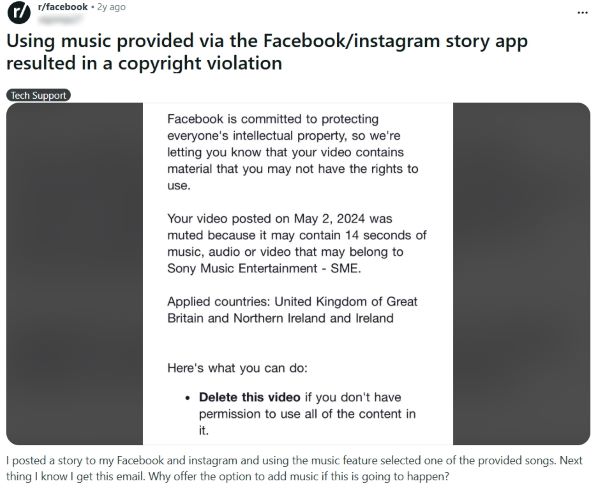
Facebook’s in-app music availability can vary by country, account type, and format, so a Story can lose coverage later and get muted in certain regions. Open the notice, confirm the affected countries, then switch to Sound Collection or a licensed track with proof.
What causes “partially muted” on Facebook videos due to a music rights match?
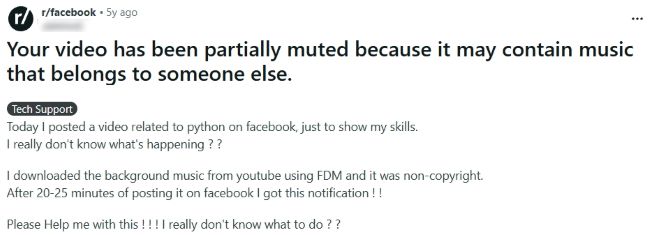
Partial muting usually means Facebook matched a segment of your audio and restricted it in specific regions, so open the notice for timestamps and countries, then replace the audio with Sound Collection or licensed music you can document.
What music rights do brands need to run Facebook or Instagram ads with popular songs?
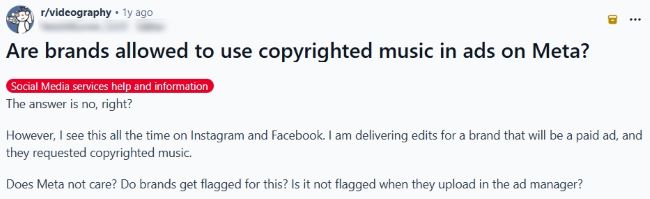
Brands need explicit rights that cover commercial and paid distribution, so plan ads around Sound Collection where it fits, custom music, or properly licensed royalty-free tracks with proof that matches your ad placements and accounts.
How can I post workout videos and avoid copyright mutes from background audio?

Record in a quieter environment when possible and add your own controlled music bed in editing, because room sound can include radio or gym music that triggers matches; keep your license proof saved with the project link.
Why does my Facebook Page show “not eligible” for monetization even with strong growth?
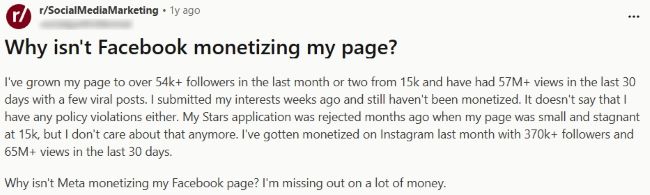
Facebook bases monetization access on your Page’s eligibility signals and policy status shown in Professional Dashboard, so check Monetization alerts, resolve any listed issues, and publish clean original content until the dashboard updates your review status.
Always publish with proof
Facebook music issues rarely come from one rule. They come from mixing the wrong music source with the wrong content type, then adding paid reach or monetization on top. Before you publish, label the post, confirm commercial intent, pick music you can prove, and save the receipt or license.



Audiodrome was created by professionals with deep roots in video marketing, product launches, and music production. After years of dealing with confusing licenses, inconsistent music quality, and copyright issues, we set out to build a platform that creators could actually trust.
Every piece of content we publish is based on real-world experience, industry insights, and a commitment to helping creators make smart, confident decisions about music licensing.


