
Instagram Music Copyright Checker for Reels & Stories (free tool)

Audiodrome is a royalty-free music platform designed specifically for content creators who need affordable, high-quality background music for videos, podcasts, social media, and commercial projects. Unlike subscription-only services, Audiodrome offers both free tracks and simple one-time licensing with full commercial rights, including DMCA-safe use on YouTube, Instagram, and TikTok. All music is original, professionally produced, and PRO-free, ensuring zero copyright claims. It’s ideal for YouTubers, freelancers, marketers, and anyone looking for budget-friendly audio that’s safe to monetize.
If you’re wondering how to check whether music is copyrighted on Instagram, the practical answer is to match the rights to your intent. This checker helps you do that fast: choose your post format, account type, and music source, then confirm whether your license actually covers Instagram and commercial use when needed.
Instagram Copyright Checker
Preflight your music choice for Feed, Reels, Stories, and Live – before you post or boost.
This checker is rules-based. It does not upload or scan audio files. Use it to spot high-risk choices and confirm license coverage before ads or client work.
In-app library lane
RF license coverage
Tip: keep your receipt/license text saved in a proof pack.
Original music checks
Stock site license checks
Advanced (optional)
Optional input for your own tracking.
Preflight
Embed This Tool on Your Website


What this tool checks (and what it can’t)
This checker looks at the choices that decide whether your music plan fits Instagram posting and promotion.
Post format (Feed / Reel / Story / Live): Post format sets the rules for how audio plays and how people share it. Feed, Reel, Story, and Live each behave differently, so the same track can succeed in one format and fail in another.
Account type (Personal / Creator / Business): Account type changes what music options you see and what Instagram allows for your use. Personal accounts get broad access, creator accounts balance reach and tools, and business accounts face stricter limits once you promote.
Intent (organic vs boost/ads vs client/branded): Intent describes what you plan to do with the post after publishing. Organic posting needs fewer checks, boosting, and ad demand rights, and client or branded work adds contracts, approvals, and proof that matches the campaign.
Music source (IG library / Licensed RF / Original / Stock site / Trending / Found online): Music source tells you where the audio comes from and how you should verify it. IG library, licensed RF, original music, stock sites, trending songs, and found audio each carry rights gaps and proof needs.
Region (optional): Region affects which tracks appear in the picker and how rights apply across countries. Use the advanced region option when you post in one market and publish in another, since availability can shift across borders.

How to check if a song is copyrighted on Instagram
Use a simple process that matches your music choice to your posting goal before you publish.
Step 1 – Identify your intent first (organic vs boost vs client work)
Start by deciding what you want the post to do after you publish it. Organic posts aim for reach and engagement, while boosts and ads turn your post into a paid placement that needs clear rights. Client work adds brand approvals and higher risk, so you should choose safer audio from the start.
Step 2 – Identify your music source
Next, name where the audio comes from, so you know what you must verify. Instagram in-app music works for casual posting, while licensed royalty-free music depends on your license scope and your planned use. Original music and stock site tracks can work well when you control the rights and keep your terms saved.
Step 3 – Run the checker and follow the exact “next steps”
Open the checker and enter your post format, account type, intent, and music source. Read the status first, then read the reason line so you understand what triggered the risk in your setup. Apply the next steps right away and rerun the check after each change until the result stays stable.
Step 4 – Save proof when you’re using licensed music
When you use licensed music, keep the documents that show your permission in plain terms. Save the receipt or invoice, the license text, and a note that lists the allowed platforms and any ad rights. Store that proof with the project files so you can respond fast if a platform review happens.
Common failure modes
Small details flip a post from fine to flagged. These are the traps teams hit most.
Business account + IG in-app library
Business accounts run into problems with in-app music because Instagram limits what brands can use. You might edit a Reel with a popular track, then the audio changes, drops, or loses eligibility when you publish. Pick music that matches license scopebusiness use from the start, so you avoid last-minute edits.

“Might boost later”
Teams often plan an organic post first and decide to boost after it performs well. That switch changes the rules because paid placement needs clearer rights than casual posting. A track that felt fine in the editor can block promotion later, so choose ad-ready audio before you export.
Region mismatch
Region mismatch shows up when you publish across markets or manage multiple accounts in different countries. A track you see in one region can disappear or behave differently in another, which breaks reposts and scheduled campaigns. Use the region option when you plan cross-border posting, then keep a backup track ready.

Live use of recorded tracks
Live raises risk because continuous recorded music plays for longer and triggers detection faster. A full song can interrupt your stream, mute audio, or end momentum while viewers watch. Use your own audio, short cleared loops, or licensed beds that cover live use, then keep levels conservative.

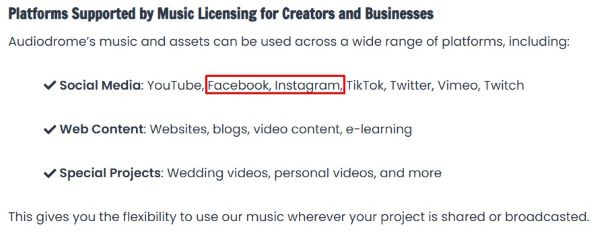
RF license without platform scope
A royalty-free receipt does not help if the license fails to name the platform or the use you need. People buy a track, post confidently, then learn the terms exclude Instagram placement or paid promotion for ads. Read the scope before you publish, then save the license text with permitted platforms and commercial rights.
Trending song with no license
Trending songs and random downloads create the fastest path to problems because you have no rights and no proof. You may get early engagement, then lose audio, face blocks, or fail approval when you try to boost. If you want the vibe, license a similar track from a proper source and keep documentation.

Music sources explained
Your music source decides what rights you need, what proof you should save, and how stable your post stays across formats and promotions.
IG library (in-app)
Instagram’s music library is the in-app picker that lets you add songs and sounds while you edit. It groups audio into lanes so you can search, preview, and attach a track fast. The library feels convenient, yet your account type, region, and intent still shape what works.
Instagram defines Original audio as unique audio you created, such as your voice, a recording, or music you made and uploaded. It can feel safer because you control the content and avoid label catalog limits. It still requires real ownership, since borrowed clips and uncleared samples create risk.
The RF lane is a label you see inside the music picker that helps you choose sounds that fit broader use inside Instagram. It reduces guesswork because you select from a clearer lane instead of a general catalog song. Use it as a stronger starting point, then confirm eligibility again before you boost or run ads.
Licensed royalty-free music
Third-party royalty-free libraries sell music with written licenses that explain how you may use a track. You pick a track, pay for the rights, and receive terms that define platforms, audience size, and commercial use. This path works well when you want predictable permissions and proof you can show.








A license must match your plan, not just your taste in music. Look for language that names Instagram or social posting, then confirm it covers commercial use when you plan ads, boosting, or client work. When the license stays vague, you lose clarity and you create delays during approvals.
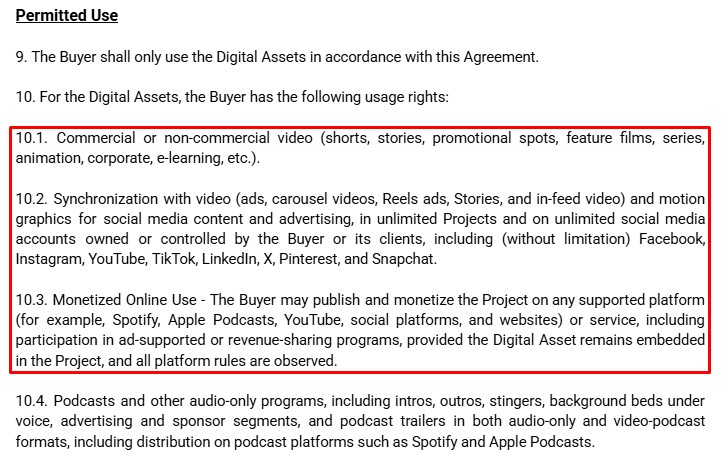
A proof pack keeps everything in one place for fast reviews. Save the receipt, the license text, the track name or ID, the purchase date, and the permitted platforms. Store it with the project files so you can answer questions quickly.
Original music
Original music works best when you control both the composition and the recording. That means you wrote the music and you own the final audio file you upload. When you hold both rights, you can post, boost, and reuse your content with fewer surprises.
Problems start when a track includes pieces you did not clear. Samples, loops, vocal phrases, and collaborations can carry rights that belong to someone else. Confirm every element has permission in writing, especially when you plan ads or client campaigns.
Stock sites: “free” ≠ “ad-safe”
Stock sites use licenses that vary by provider, plan, and track type. Some require attribution, some restrict edits, and some limit commercial use unless you buy an upgrade. Read the exact terms for Instagram posting and paid promotion before you build a campaign around the track.
Trending / Found online: why the checker marks these as highest risk
Trending songs and random downloads come with no rights you control and no proof you can show. You can publish today and lose audio later, or you can fail as soon as you try to boost. If you want the style, switch to licensed RF or use your own original music.
Why boosting and ads change everything
Organic posting stays close to personal sharing, so you can often publish with fewer checks. Boosting and ads turn that same post into paid distribution, which puts your music choice under stricter expectations. The difference shows up fast when a track plays fine in the feed but stalls during promotion.
Paid placement also expands who touches the content and where it can appear. Brands, partners, and clients expect repeat use, clean approvals, and the ability to scale without rebuilding edits. When your rights do not match that plan, you lose time to re-edits, new exports, and delayed launches.
That is why the checker asks about Ad intent instead of guessing your plan. Turn it on when you might boost, even if you feel unsure today, and you will see the safer path early. The result pushes you toward music sources and license scope that support promotion before you spend.
Step-by-step: run a clean preflight
Start with Post type and pick Feed, Reel, Story, or Live based on the content you plan to publish. Choose Account type next, because Personal, Creator, and Business change what Instagram allows once distribution expands. Set Usage intent right away, since organic posting, boosting, and client work call for different levels of rights.
Select your Music source and stay honest about where the audio comes from, since that choice drives the result. If you pick IG library, choose the lane you plan to use, then stay consistent with that lane during editing. If you pick Licensed RF, answer the two coverage questions so the checker can match your license to your plan.
Open Advanced only when the region matters for your workflow, such as cross-border posting or multi-market scheduling. The extra context helps you plan audio that holds up across accounts and locations. Keep this step optional so the flow stays fast for everyday posting.
Click Run checker and read the badge first, then read the reason line to understand what raised risk in your setup. Apply the next steps immediately, then run the check again after each change until the badge stays steady. Finish by saving proof when you use licensed audio, so you can respond fast during review.
What you’ll see in the results (and how to act)
The badge gives you the decision in one glance. OK means your plan aligns with your inputs, so you can move forward with confidence. Review means you need to confirm rights or adjust a choice, while Don’t use means you should swap the audio before you publish or promote.
The “Why this result” line explains what triggered the badge in plain language. It ties the outcome to one clear factor, such as account type, intent, or music source. Use that sentence to align your team fast, since it shows the reason behind the change without extra debate.
The “Next steps” section turns risk into action you can complete right away. It points you toward the exact fix, such as choosing a safer source, confirming license scope, or changing your promotion plan. Apply the steps, rerun the checker, and lock your edit only after the badge stays stable.
Format-specific risk at a glance
Instagram treats music differently across formats. Rules shift with long audio playtime, post visibility, and whether you boost. The same track can be fine in one surface and fail in another, so format choice often changes risk for creators everywhere.
Reels feel UGC-friendly, but audio source and rights matter when you promote. In-app consumer tracks often fail for ads. Use Meta Sound Collection or licensed royalty-free music for campaigns, keep receipts and allowed-platform notes, and expect tighter checks on boosts.

Stories look casual, yet they follow rules similar to Reels. Link stickers, product tags, or branded content toggles change what’s allowed, especially for promotions. Keep background music low or absent, prefer rights-cleared audio, and confirm license covers Instagram and advertising.

Live carries the highest interruption risk. Detection ramps up with full songs and long clips; streams mute or end mid-session. Use original audio, short cleared loops, or royalty-free beds with live-stream rights; keep levels modest and avoid continuous playback during broadcasts.

Why a preflight beats post-mortems
A quick preflight gives a traffic-light call before you publish or boost. You pick post type, region, account, and source; it returns OK, Review, or Don’t post. That split-second decision helps you avoid surprises, wasted spend, and awkward takedowns later.
It doesn’t just flag risk; it tells you what to do next: switch to Meta Sound Collection, use a licensed royalty-free track, upload proof, or turn off boosting. You get clear, practical steps that align music rights with the plan.
Preflight saves time you usually burn on re-edits, re-uploads, and broken momentum. You adjust audio before creative locks, not after a claim hits. Teams keep continuity, protect the budget, and ship on schedule with fewer surprises, headaches, and last-minute scrambles later.
FAQs
Real creators and marketers run into the same music issues again and again, so these quick answers focus on the exact moments when posts get muted, boosts fail, or catalogs change.
How can I tell if my video or audio is copyrighted, and where can I get safe music?
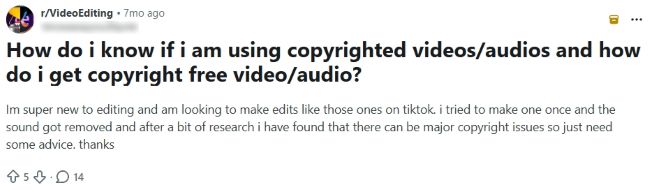
Instagram does not label a track as “safe” in a universal way, so start by matching your intent to your music source before you publish. Use the checker to confirm whether your plan relies on in-app music, a license, or audio you own, then follow the next steps it gives you. When you need low-risk options, choose cleared sources and keep proof so you can defend the use.
Why can’t I run Reels ads when my Reel uses music from Instagram’s library?
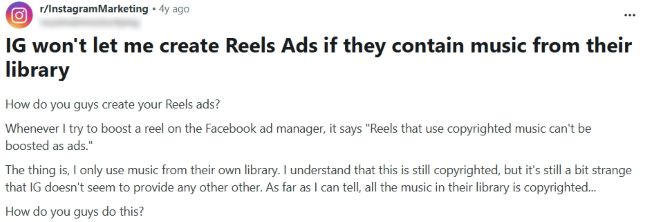
Instagram’s in-app music works for posting, but ads and boosting require clearer rights because you pay for distribution. That is why you can see a track in the editor and still get blocked when you try to promote the Reel. Turn on Ad intent in the checker and switch to a source that supports campaigns before you build versions for paid.
What does the RF label mean in Instagram music?

RF is a label you see inside Instagram’s music picker that points to a royalty-free lane within the app. It signals a cleaner starting point than standard library songs because the lane aims for simpler reuse and fewer restrictions. You should still verify your plan for boosting and client work, since promotion adds requirements beyond casual posting.
Why can my friend’s business account use real trending music, but mine can’t?
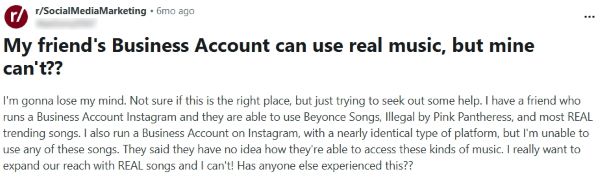
Instagram changes music availability by account, region, and rollout, so two business profiles can see different catalogs on the same day. Your friend may sit in a test group or a region with different licensing, while your account faces tighter limits for business use. When you need consistent access, plan around licensed sources you control and rerun the checker before you boost.

At Audiodrome, we create interactive tools designed to simplify music licensing and monetization. They help creators, agencies, and businesses avoid common mistakes, save time, and stay compliant while building content that earns fairly across platforms.
Each tool translates complex rules into clear, practical guidance. Our goal is to give you confidence before publishing, ensuring your projects are protected, professional, and ready to succeed in a fast-changing media landscape.


