
Instagram Monetization Checker: Free Fast-Check for Status, Eligibility & Fixes

Instagram monetization can feel confusing because features change by account, region, and rollout timing, so you can do everything right and still miss a toggle. This fast check helps you estimate readiness in under a minute by reviewing your account setup, what you see in the Professional Dashboard, and common risk signals tied to policies and rights. You get a clear result plus the next fixes to run before you post or promote.
For official status in the app: Profile → Professional Dashboard → Monetization.

Run the Instagram Monetization Checker (Fast-Check)
Use this fast check when you want a quick read on monetization readiness before you post, pitch a brand deal, or boost a Reel.
Instagram Monetization Fast-Check
Quick self-check for Subscriptions, Gifts, Badges & Branded Content. For official status, open Profile → Professional Dashboard → Monetization.
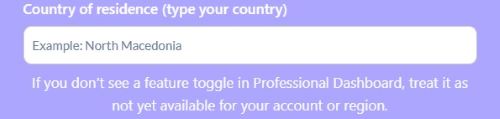
If you don’t see a feature toggle in Professional Dashboard, treat it as not yet available for your account or region.
We don’t store your answers – this checker runs in your browser.
Your Eligibility Estimate
Embed This Tool on Your Website

How this checker works
The checker runs inside your browser, so it can respond instantly as soon as you click Run Fast Check. It reads the answers you select, then builds your result on the page in front of you. You can close the pop-up when you finish, and you keep control from start to finish.
The checker focuses on the same friction points that slow creators down on Instagram. It looks at basic eligibility gates like professional account setup, age, and payout setup, then it reviews risk signals like recent violations and content red flags. It also uses dashboard visibility, since missing feature toggles often point to rollout limits.
What you’ll get
You will see an overall estimate that summarizes your current readiness in one clear label. A Likely Eligible result means your setup looks ready and your risk signals look clean for now. An At Risk or Not Eligible result points to the specific areas you should fix before you rely on monetization.
You will also see program cards that break down each earning path into plain outcomes. Subscriptions, Gifts, and Badges depend on what your Professional Dashboard shows and whether your account signals stay clean. Branded content depends on correct partnership labeling, since brand posts raise the bar on compliance and proof.
You will get a short list of top fixes that tells you what to change first for the fastest improvement. The tool prioritizes setup steps like switching to a professional account and completing payouts, since those gates block everything else. It then surfaces the content and policy issues that can limit features or pause earnings until you clean them up.
Where to check monetization on Instagram (official status)
Instagram gives the official answer inside the app, so start there before you rely on any estimate or third-party checklist, and keep the monetization requirements in mind when you interpret what you see.
The exact place to look
Tap your Profile icon (bottom-right).
%20Eligibility%2C%20Policies%20%26%20Fixes/New%20folder/Step%201.jpg)
Tap the menu icon (top-right ☰).
%20Eligibility%2C%20Policies%20%26%20Fixes/New%20folder/Step%202.jpg)
Scroll to Account type and tools and tap it.
%20Eligibility%2C%20Policies%20%26%20Fixes/New%20folder/Step%2023.jpg)
Tap Monetisation.
%20Eligibility%2C%20Policies%20%26%20Fixes/New%20folder/Step%2024.jpg)
Tap Monetisation status to view your current status and any restrictions.
%20Eligibility%2C%20Policies%20%26%20Fixes/New%20folder/Step%2025.jpg)
What you’re looking for once you’re there
Look for your monetization status and any eligibility messages tied to your account. The app usually shows a clear signal that you can earn, that your account needs attention, or that you need to complete a setup step. Read those messages like a checklist, because Instagram often points you to the next action that unlocks progress.
Next, look for feature availability, since Instagram only shows toggles for features it enables on your account. When you do not see a feature like Subscriptions, Gifts, or Badges, the simplest explanation involves availability for your account or your country. You can still prepare your content and compliance now, then recheck later for the toggle to appear.
If you don’t see Monetization in the dashboard
Start with your account type, because a personal account often hides professional tools until you switch. Then confirm the age gate, since Instagram uses age to decide whether it can enable earning features. After that, check region rollout and payout setup, because rollout timing and unfinished payouts can block the Monetization area from appearing.
Instagram monetization status check (what “eligible” vs “at risk” means)
Your monetization status acts like a traffic light that tells you whether Instagram will let you earn right now and what you need to fix next.
What “Likely Eligible” usually means
Likely Eligible usually means you pass the basic gates, and Instagram can verify your setup. You run a professional account, you meet the age requirement, and you completed payout setup, so the foundation looks solid. You also keep a clean recent history and you can see the relevant monetization features inside the Professional Dashboard.

What “At Risk” usually means
At Risk usually means Instagram sees signals that can limit monetization, even if your setup looks correct. Recent violations, reused content, unsafe themes, or unclear music rights can push your account into a caution zone. This status often shows up right before feature limits, reduced access, or payout friction.
At Risk can also appear when you lack a clear status view inside the app. If you select “I’m not sure” or you cannot confirm what Monetization shows, the safest assumption is to stay cautious. In practice, an unclear status means you should verify the official screen and clean up anything that can trigger a review.
What “Not Eligible” usually means
Not Eligible usually means a key requirement blocks monetization at the account level. A personal account, missing age eligibility, or unfinished payout setup can stop every earning feature from the start. This status can also show when Instagram marks your account as not eligible for monetization, which requires you to resolve the listed issue before earnings can start.

Inputs explained (what the checker evaluates and why)
These inputs mirror the real checkpoints that decide whether monetization features appear, stay active, and pay out without interruptions.
Profile basics
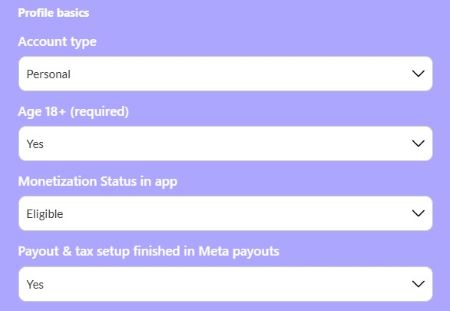
Start with account type and age because Instagram uses them as the front door to monetization. A personal account often keeps monetization tools out of reach, while a professional profile opens the dashboard that controls earnings features. The age requirement matters because Instagram limits earning tools to adults, and the system checks it early.
Next, choose the monetization status you see inside the app, since that screen reflects Instagram’s current decision about your account. If you feel unsure, select “I’m not sure” so the checker can respond with cautious guidance and clear next steps. Then confirm payout and tax setup, because Instagram cannot pay you until you complete this part.
Feature availability in Professional Dashboard
This checker asks whether you can see toggles for Subscriptions, Gifts, and Badges because visibility often signals real access. When you see a feature inside the Professional Dashboard, you can usually move forward with setup and content planning. When you do not see a feature, Instagram has not opened it for your account yet.
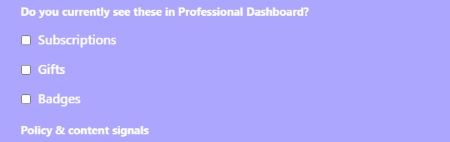
Feature visibility can change with rollout timing, region support, and account history. Instagram can enable one earning path while keeping another off, even on the same account. That is why this checker uses what you see in the app as a practical reality check before you build a plan around a feature.
Policy & content signals
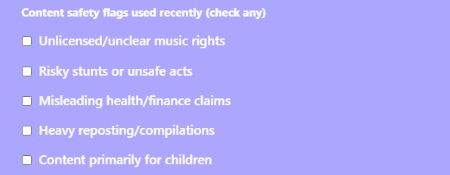
Instagram watches for recent violations and removes content because they signal risk to the platform and to advertisers. One policy issue can lead to warnings, limits, or delays, so the checker asks about your last 60 days to focus on what matters now. A clean recent streak often improves access and stability.

The checker also asks about reposting and compilations because heavy reuse can reduce originality signals and trigger extra review. It asks about risky stunts and unsafe acts because Instagram aims to limit rewards for dangerous content. It asks about misleading health or finance claims and child-focused content because those themes can restrict monetization and narrow what ads can run.
Plans for the next 30 days
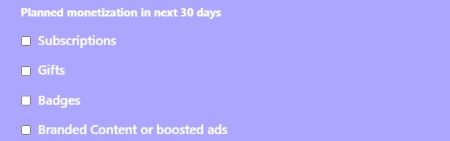
Your plans matter because ads and branded posts raise the stakes for compliance and proof. If you plan to boost content or run partnership posts, you need cleaner signals and clearer rights than a casual post. This input helps the checker shift its guidance toward safer choices before you spend money or sign a deal.
Branded content readiness
Branded content requires clear disclosure, so the checker asks whether you will use the Paid Partnership label and tag the partner. This step protects you, the brand, and the audience because it marks the post as a partnership from the start. When you skip it, you invite disputes, limits, and approval problems that can disrupt earnings.

Country/region
Location matters because Instagram rolls out monetization features by country and sometimes by account category. Two creators can follow the same steps and still see different options because the feature may not support their region yet. If you do not see a feature, assume it stays unavailable for your account until the toggle appears inside Monetization.
How to read your results (step-by-step)
Your results break into three layers, so you can understand the big picture first and then zoom in on the exact feature that needs work.
Overall badge
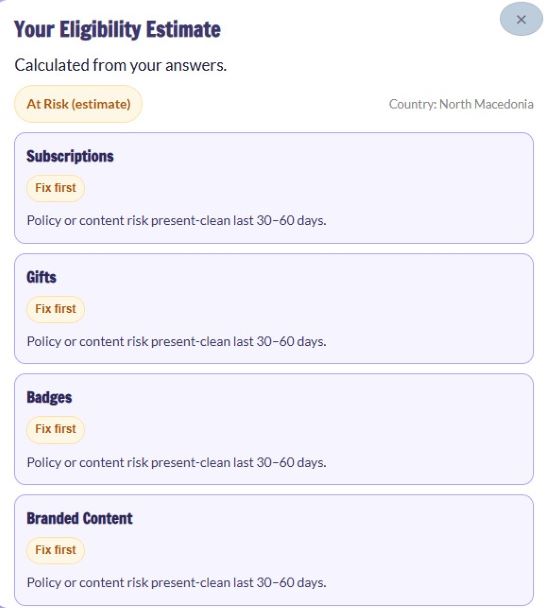
The badge gives you a quick summary of your current readiness in one label. It combines your profile basics, payout setup, dashboard visibility, and content risk signals into a single outcome you can act on. Use it as a starting point, then read the cards and fixes to understand the specific reason behind the label.
%201.jpg)
Program cards
Each card focuses on one earning path so you can plan with clarity instead of guessing. A Ready card usually means you meet the base requirements, you see the feature in your dashboard, and your recent signals look clean enough to proceed. A Fix first card points to a setup or policy issue that can block that feature even when others look fine, while a Not available card usually means Instagram has not opened that feature for your account or region yet.
Subscriptions, Gifts, and Badges follow the same logic, so compare them side by side to see which paths you can use right away. Branded Content works a little differently because it depends on correct disclosure, so the card focuses on the Paid Partnership label and tagging the partner. When the Branded Content card says Fix first, it means you need to correct the partnership setup before you publish or promote a branded post.
%202.jpg)
Top fixes
The fixes list helps you move from information to action without getting overwhelmed. Start with the first one to three items because they usually unlock the biggest progress fast, like switching to a professional account or finishing payout setup. After you complete those steps, rerun the check so you can confirm improvement and focus on the next item.
%203.jpg)
Common misunderstandings
It can feel unfair when a friend has a feature, and you do not, but rollout timing often explains the gap. Instagram can open Gifts or Subscriptions for one account before another, even when both accounts look similar from the outside. Keep checking your Monetization screen weekly and keep your account signals clean so you are ready when the feature appears.
A professional account helps, but it does not guarantee feature access on its own. Account history, region support, and rollout waves can still limit what you see in Monetization, even after you switch to Creator or Business. Focus on the basics you control, then use dashboard visibility as your reality check for what you can use today.
Fixes if you’re not eligible (the exact next actions)
When Instagram blocks monetization, a small setup step often sits behind the problem, so work through these fixes in order and recheck your status after each one.
Fix 1 – Switch to a Professional account
Choose Creator when you focus on personal content, community growth, and creator tools like insights for Reels and audience engagement. Choose Business when you run a brand, sell products or services, or manage marketing workflows that fit a company profile. Either option unlocks the Professional Dashboard, which is where Instagram places monetization controls.
Fix 2 – Confirm the age gate
Instagram reserves monetization tools for adults because earnings features connect to payouts, tax reporting, and advertiser standards. Age eligibility also protects the platform from payments and partnership issues tied to minors. If you fail this gate, Instagram can hide monetization options until your account meets the requirement.
Fix 3 – Finish payout and tax setup
Payout setup finished means you completed the Meta payout flow end to end, added your payment details, and provided the tax information the system asks for. Instagram uses this step to confirm it can send money to a real account and report it correctly. Until you finish it, you may see monetization options without receiving payments.
Fix 4 – Clean up recent policy issues (30 to 60 days)
Start by reviewing the posts that caused warnings, removals, or limits, and either edit them or remove them so the issue stops repeating. Then publish new content that stays inside Instagram’s rules for a steady stretch so your recent history looks stable. Consistency matters because Instagram looks at patterns, not one good day.
Fix 5 – Reduce reposting and increase originality
Increase originality by filming your own clips, recording your own voiceover, and adding on screen explanation that you create from scratch. If you use trends, add unique value such as a clear tutorial, a fresh example, or your own commentary instead of a simple repost. Build a repeatable format, like a weekly series, so Instagram sees consistent original work.
Fix 6 – Branded content compliance
Use the Paid Partnership label on every sponsored post and tag the partner because Instagram expects clear disclosure for brand deals. This step protects your account and the brand by showing the relationship in the post metadata, not only in the caption. If you skip it, Instagram can restrict the post, block promotion, or limit monetization options tied to partnerships.
Fix 7 – Feature not visible
When a feature does not appear in Monetization, Instagram has not opened it for your account yet, so focus on readiness while you wait. Check the Professional Dashboard and Monetization once a week, then keep your account clean and complete payout setup so you can activate the feature the moment it shows up. If you see one feature but not another, plan around what you can access today and keep building consistency.
Music rights (a common reason monetization gets restricted)
Music causes monetization problems when Instagram cannot confirm you have the right to use the audio, especially on posts that earn money or run as ads. Unclear rights create risk for the platform because a rights holder can claim the audio after you publish. That risk can trigger limits, muted sound, blocked posts, or lost earnings.
%201.jpg)
Choose audio that makes your rights easy to prove before you publish or promote. Platform provided music can work for certain posts when the library allows your intended use, but eligibility can change by region and by format. For monetized content and branded work, a properly licensed royalty-free track gives you clear permission across posts and campaigns, and it starts with the music license terms your agreement spells out.
%202.jpg)
Keep simple proof that you can pull up fast if Instagram flags a post or a partner asks for clearance. Save the license or receipt, the terms that describe allowed use, and the track details, such as title and source. Store them in one folder so you can respond fast during a dispute, and move straight into removing a copyright claim if Instagram flags your audio.
FAQs
Quick answers to the most common monetization questions creators run into when the dashboard looks different from what was expected.
What does “able to monetize” on Instagram mean?
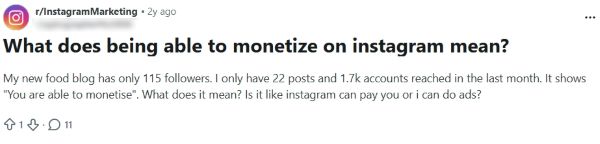
It means Instagram currently allows your account to access one or more earning features, not that every monetization tool will appear at once. Your status can look “okay” while specific options like Subscriptions, Gifts, or Badges still depend on rollout, region, and what you see in the Professional Dashboard. Use the official Monetization screen to confirm what you can activate today, then use this checker to map your next steps.
I’m 16. Can I monetize my Instagram account?
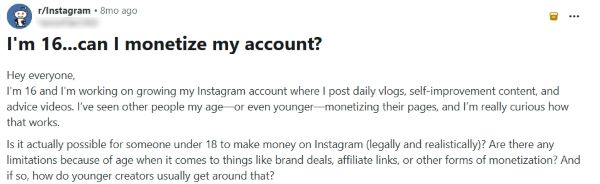
Instagram reserves built-in monetization features for adults, so age usually blocks tools like payouts, Badges, and other earning options inside Monetization. You can still earn in indirect ways, like brand deals off-platform, affiliate links, or selling products, but those do not count as Instagram monetization features. If your account shows earning tools anyway, confirm your age and status in the Professional Dashboard and follow what the app displays.
Branded Content says “Account eligibility at risk”. What should I do?
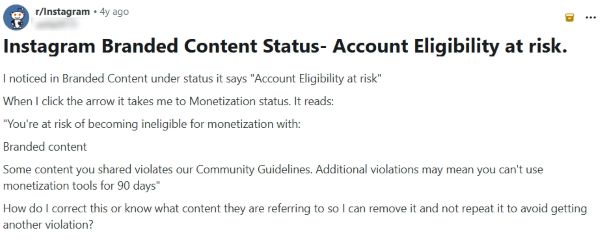
Start by opening the Professional Dashboard, then Account Status and Monetization, since Instagram often points to the type of content that caused the risk label. Clean up anything that triggers policy friction, then keep your next posts simple, original, and compliant, so your recent history looks stable. For partnership posts, use the Paid Partnership label and tag the partner every time, since branded content requires clear disclosure.
How do I fix “Ineligible country or region” for monetization?
.jpg)
Instagram ties some monetization tools to country eligibility, so the app can block features if it cannot confirm your current location or account region. Check your account settings, payout profile, and any linked Meta payout details to confirm your country matches your real residence. If Instagram offers a review option, use it after you confirm your settings, then keep checking Monetization because access can change with rollout timing.
Why don’t Live Badges show up in my settings?
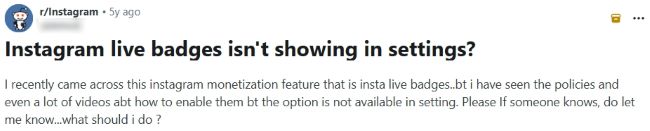
Badges only appear when Instagram enables them for your account and region, so a missing toggle usually means the feature has not opened for you yet. Confirm you run a professional account and check the Professional Dashboard, since badges live under monetization tools rather than regular settings. If badges still do not show, focus on clean content signals and recheck the Monetization area weekly for rollout updates.
Your next best move
Monetization gets easier when you stop guessing and start checking what Instagram shows for your account today. Use the official Monetization screen to confirm what is available, then run this fast check to spot the one setup step or risk signal that holds you back. Fix the basics, keep your recent posts clean, and recheck weekly.

At Audiodrome, we create interactive tools designed to simplify music licensing and monetization. They help creators, agencies, and businesses avoid common mistakes, save time, and stay compliant while building content that earns fairly across platforms.
Each tool translates complex rules into clear, practical guidance. Our goal is to give you confidence before publishing, ensuring your projects are protected, professional, and ready to succeed in a fast-changing media landscape.


