
Facebook Monetization Eligibility Checker

Audiodrome is a royalty-free music platform designed specifically for content creators who need affordable, high-quality background music for videos, podcasts, social media, and commercial projects. Unlike subscription-only services, Audiodrome offers both free tracks and simple one-time licensing with full commercial rights, including DMCA-safe use on YouTube, Instagram, and TikTok. All music is original, professionally produced, and PRO-free, ensuring zero copyright claims. It’s ideal for YouTubers, freelancers, marketers, and anyone looking for budget-friendly audio that’s safe to monetize.
Publishing first and checking later is how creators get surprised by limits, muted videos, or blocked monetization. This preflight is a quick self-check that helps you confirm the items Meta uses to judge monetization readiness – before you post.
This tool does not connect to your Facebook account and cannot read your dashboard. It turns your answers into a practical “risk tier” and tells you what to verify next. For official eligibility and program availability, Meta directs you to check inside Meta Business Suite / Professional Dashboard → Monetization.

How to verify your official monetization status (60 seconds)
Check your status within Meta’s own Monetization surfaces first, as that screen displays the actual eligibility, restrictions, and review options associated with your Page or profile.
Where to check for a Facebook Page on mobile (Facebook app)
Route A: Quick access from the bottom bar
Tap the insights/dashboard icon in the bottom navigation (bar chart).
%201.jpg)
Open Professional dashboard for the Page and tap Monetisation in the top tabs.
%202.jpg)
Read the status shown there and open any restriction details or review prompts.
Route B: Access through Menu
Tap the Menu/profile area in the bottom navigation.
%203.jpg)
Tap Professional dashboard.
%204.jpg)
Tap Monetisation in the top tabs.
%205.jpg)
Review eligibility, program access, and any policy items shown on that screen.
Where to check for a Facebook Page on desktop
Open the Page’s left navigation and click Professional dashboard.
%206.jpg)
Click Monetization in the dashboard menu.
%207.jpg)
Review your status, then open the linked details for any flagged policy area.
Where to check for a personal profile on mobile (Facebook app)
Route A: Bottom bar shortcut
Tap the insights/dashboard icon in the bottom navigation (bar chart).
%208.jpg)
In Professional dashboard, tap Monetise in the top tabs.
%209.jpg)
Review what appears under monetisation for your profile, including eligibility and any limits tied to your account.
Route B: Menu route
Tap your profile picture on the top right to open Menu.
%2010.jpg)
Tap Professional dashboard.
%2011.jpg)
Tap Monetise in the top tabs.
%2012.jpg)
Read the status, then open any restriction card or prompt shown on that screen.
Where to check for a personal profile on a desktop
Open Facebook on desktop and use the left navigation to click Professional dashboard.
%2013.jpg)
In the dashboard menu, click Monetization.
%2014.jpg)
Review your eligibility and any restrictions, then follow the on-screen review steps when Meta offers them.
Facebook Monetization Eligibility Checker
Monetizing on Facebook sounds simple – post content, grow an audience, and watch the payouts come in. But the reality is trickier. Meta enforces strict rules, and one wrong move can lock you out of earnings entirely.
That’s why we built the Monetization Eligibility Checker. It mirrors the same checks Meta uses (Partner Monetization Policies, Content Monetization Policies, and Page Quality), so you can spot problems before they cost you revenue. It’s quick, transparent, and designed to give you clear next steps.
Facebook Monetization Eligibility Checker
Quick self-check for PMP/CMP readiness. For official status, open Professional Dashboard → Monetization.
Your Eligibility Estimate
Embed This Tool on Your Website

Estimator only – always confirm status in Professional Dashboard → Monetization.
What this checker evaluates
Facebook offers monetization features when both your account and your content meet policy requirements (PMP + CMP). Meta’s official creator pages emphasize that adherence to these policies and Community Standards is required for any earning features.
Partner Monetization Policies (PMP). Partner Monetization Policies set the account-level rules Meta uses to decide whether a Page or creator can access monetization tools. Meta now uses the name Partner Monetization Policies for what it previously called Monetization Eligibility Standards. Your dashboard status for PMP often determines whether monetization features show up at all, which leads into CMP checks next.
%20-%20overview.jpg)
Content Monetization Policies (CMP). Content Monetization Policies focus on whether the posts you publish qualify to earn, based on content standards that protect advertisers and viewers. Meta now uses the name Content Monetization Policies for what it previously called Content Guidelines for Monetization. When CMP issues appear, Meta can limit earning on specific content even when your account looks fine, so integrity signals become the next checkpoint.

Page and account integrity signals (Page Quality and related limits). Meta surfaces show integrity and restriction signals through places like Page Quality and other status screens, and those signals can limit features across the Page. When those surfaces show restrictions, monetization options shrink until the restriction clears in Meta’s systems. This checker uses this input to mirror what your own surfaces communicate before you publish, so you can focus on content signals with confidence.
Originality and advertiser-friendly content signals. Meta prioritizes original creator work and can restrict monetization for accounts that repeatedly repost unoriginal content without permission or meaningful enhancement. Advertiser-friendly context matters as well, since Meta requires compliance with monetization policies to earn. Together, originality and ad-suitable themes help your posts qualify more consistently, which makes this preflight worth running every time.
Program changes to keep in mind in 2025
Meta is consolidating programs. In-stream Ads, Ads on Reels, and the Performance Bonus Program stop paying after August 31, 2025, with creators being invited into a new Facebook monetization experience. Plan your strategy with this cutoff in mind and confirm details in your dashboard.
.jpg)
Inputs explained and why they matter
Each input in the Checker reflects a rule Facebook already applies. Knowing why they matter helps you understand what drives your eligibility and where problems can block monetization.
Profile basics
Page or Professional-mode profile determines which monetization products are open to you. Facebook treats them differently in PMP and CMP reviews, so your setup directly influences what programs appear in your dashboard and how eligibility is checked.
Age 18+ is a hard requirement for many features, including Stars, Subscriptions, and in-stream ads. If you are under eighteen, monetization is blocked entirely. The Checker highlights this so you don’t pursue unavailable options.
Country availability is equally important. Monetization features only roll out in approved regions. If your dashboard shows your country as ineligible, no amount of original content or followers will switch monetization on until availability changes.

Policy standing
PMP status shows who you are, how genuine your presence is, and if your Page follows Meta’s rules. If your PMP is flagged, monetization tools stay locked. Content quality cannot override a failed PMP review.
CMP status focuses on your posts and videos. Even if your Page is eligible, Meta checks originality and ad safety before serving ads on each post. A CMP failure means that specific content cannot earn money.
Page Quality brings everything together. If your Page has repeated misinformation strikes, spam, or other violations, monetization can be cut off platform-wide. This metric shows how Facebook views the overall trustworthiness of your account.

Content signals
Originality is one of the strongest factors. Facebook rewards fresh, creator-made content and penalizes obvious reposts, compilations, or clips that offer little transformation. Without originality, your videos will almost always fail monetization checks.
Brand-safety ensures advertisers feel comfortable appearing next to your content. Even if posts remain on the platform, anything shocking, misleading, or adult-focused risks being ineligible for ads. This is often where creators lose revenue.
Recent violations matter because Facebook reviews your last ninety days closely. A clean record helps unlock features, while recent warnings make your Page look unreliable. The Checker weighs this because fresh infractions reduce your chances quickly.

Program interest
In-stream Video, Ads on Reels, and Bonuses have been central to Facebook’s monetization. However, Meta ends payouts from these programs on August 31, 2025. The Checker reminds you that these options will no longer generate earnings.
Music Revenue Sharing allows certain Facebook videos using licensed songs to earn ad revenue, but the payout is split with rights holders. The Checker sets expectations by showing that music monetization is limited and never bypasses PMP or CMP.
Interpreting your result and what to do next
The Checker’s output points you toward the next steps. No matter if you appear ready, need fixes, or are blocked, each result provides clear actions you can take before publishing or applying for monetization.
If you see Likely Eligible
Confirm eligibility in your Professional Dashboard and complete any setup tasks such as connecting payouts, granting permissions, or enabling two-factor authentication. These steps ensure your account is fully prepared to start receiving revenue.
Publish original and brand-safe content consistently to protect your CMP standing. Even small lapses in quality or reuse can undermine eligibility, so treat every post as a chance to reinforce compliance.
If you plan to use licensed music in Facebook videos, review the Music Revenue Sharing program carefully. Always verify if the track qualifies, and track each video’s eligibility directly in your dashboard.

If you see Needs Fixes
Open Professional Dashboard → Monetization and Page Quality to identify the exact policy creating problems. Addressing flagged issues here is the fastest way to restore or unlock monetization features.
Strengthen originality by editing with intent – transform reused material meaningfully, or better yet, create content from scratch. Facebook favors creators who demonstrate fresh value in every upload, which helps avoid CMP restrictions.
Re-run the Checker after you’ve resolved policy warnings to confirm your progress. This gives you a reliable before-and-after snapshot and keeps your team aligned on what’s been fixed.

If you see Not Eligible Yet
Address PMP blockers first. Failing PMP means you cannot monetize, no matter how strong your content is. Authentication, compliance, and Page integrity must be resolved before anything else.
If your country is ineligible, shift focus to building your audience while you wait for Meta to expand availability. You can also diversify income streams off-platform to reduce dependency.
If you believe restrictions are a mistake, use Meta’s appeal process. Provide clear documentation, respond promptly, and check the resolution inside your dashboard. This path can restore eligibility if errors are involved.

Common reasons Pages fail monetization checks and how to fix
When monetization fails, the dashboard usually points to one layer that blocks the rest. Start here to identify the layer, fix it with the right action, then rerun your preflight before you publish again.
PMP issue (Partner Monetization Policies)
A PMP issue shows up when Meta limits monetization tools at the account level, before it even looks at a specific post. Your Page can keep getting views while the Monetization area shows limited access, missing options, or a blocked path to programs. Once you clear this layer, CMP checks start to matter again.

Fast fix: Open Meta Business Suite and go to Monetization for the Page you plan to post from, then review Policy issues. Follow the exact step Meta shows, since it ties your next action to the specific policy area that triggered the limit. After you complete the requirement, check Monetization again and run this preflight with your updated status.
CMP issue (Content Monetization Policies)
A CMP issue appears when Meta flags earning eligibility for recent content, even if your Page still looks fine at the account level. You may see limits tied to certain posts or formats, because Meta evaluates content quality and ad suitability at the post level. This pattern often surprises creators right after they publish, so a preflight check saves time.

Fast fix: Go to Monetization and open Policy issues to find the content reason linked to the limitation. Then adjust your next post with stronger originality, clearer context, and claims you can support, since CMP often reacts to how the content reads to advertisers. Publish the improved version, confirm the dashboard update, and rerun the checker before you post again.
Restricted or at-risk integrity signals
Integrity restrictions surface when Meta flags the Page for trust and quality risk, and that signal can shrink features across the Page. You might see normal reach on some posts while monetization options tighten, since the system evaluates the Page as a whole. This layer sits between policy standing and content quality, so it can block progress until it clears.

Fast fix: Check Page Status first to see what Meta flags at the Page level, then return to Monetization and review Policy issues for monetization-specific limits. Resolve the root restriction with the action Meta lists, since it connects the Page signal to a concrete fix. Once the Page surfaces show a clean state, rerun the preflight and focus on content signals again.
Reused or compilation content risk
Reused content risk builds when your Page relies on reposts, compilations, or lightly edited clips that lack clear creator input. Meta has discussed enforcement against repeated reposting of unoriginal content, and monetization access can drop when that pattern becomes your footprint. This issue often hides behind strong engagement, then surfaces as sudden monetization limits.

Fast fix: Shift your next posts toward creator-made footage, your own voice, and edits that add clear value beyond a repost. Build a short run of original posts in a consistent format so the Page shows a stable publishing pattern. After that run, review Monetization, then use this checker as your routine gate before each upload.
Recent notices or violations
Recent notices raise risk when policy events stack close to today, since Meta reviews current standing inside monetization surfaces. Your Page can keep posting while earnings access stays limited, which creates a mismatch between reach and revenue. You often spot this pattern when Policy issues show recent events tied to monetization.

Fast fix: Open Monetization and review Policy issues to confirm the active items linked to your Page. Then publish a clean run of compliant posts and keep topics and claims tight so you stop adding fresh events to your record. When the dashboard returns to a clean status, rerun the checker and move forward with higher confidence.
Country or language not available
Availability limits show up when the monetization product you want has not rolled out to your country or language for your account. Your content quality can stay strong, and your policies can look clean, yet the program list still stays empty or restricted. This layer blocks monetization until Meta expands access for your region.

Fast fix: Confirm what Monetization shows for your Page, then cross-check Meta’s official availability list for Facebook Content Monetization. If availability blocks you today, focus on consistent, compliant publishing so your Page stays ready when access opens. Recheck Monetization on a schedule and run this preflight every time you plan a monetized post.
Monetization can change even when your status shows eligible
Eligibility lives inside Monetization surfaces as account access, while earnings outcomes can shift per video when Facebook detects a Rights Manager match or applies program rules, so you can see three different earning outcomes on a live post.
Outcome 1: Rights Manager match collects ad earnings
A Rights Manager match can attach your video to a reference file owned by a rights holder. The rights holder can choose a match action inside Rights Manager, and one option is Collect ad earnings. This outcome often appears after Facebook matches audio or video segments to a registered catalog.

Your video can stay live and still run ads when a rights holder selects Collect ad earnings. In that case, Facebook routes ad earnings from the matched video to the rights holder under the selected action. Creators usually learn about it through an earnings or copyright notice tied to that video.

This outcome comes from rights holder enforcement on matched content, so monetization status alone does not protect your revenue path. Music choices become part of your preflight, especially for ads, branded posts, and long-form monetization. When you plan to earn, pick audio you can document, then publish with a clean proof trail.
Outcome 2: Earnings get withheld during a dispute
A dispute starts when you challenge a match or a monetization restriction tied to a match. Meta’s help explains that you can dispute demonetization that happens due to matches. The dispute opens a review path, and it puts the video into a decision workflow.

During the review window, Facebook can switch the payout state for the matching video while the dispute remains open. Meta explains that Facebook withholds earnings during an open dispute, then finalizes payout after the dispute ends. This withholding protects both sides while the review runs.
Outcome 3: Music Revenue Sharing splits revenue by design
Music Revenue Sharing sits in a separate bucket for eligible videos that use licensed songs under the program. Meta states that creators receive a 20% revenue share on eligible videos, with separate shares going to rights holders and Meta. You will see this as a revenue share outcome rather than a match enforcement action.

This outcome follows program rules that define how revenue splits when licensed music qualifies for Music Revenue Sharing. The notice language typically points to revenue sharing instead of collection, so it feels different in your workflow. If your goal is stable monetization, choose music sources with clear usage terms and predictable monetization behavior.
Music and copyright can block monetization
Monetization starts with eligibility, then every video still faces music rules that decide whether your audio stays, your ads run smoothly, and your earnings are routed to you.
Meta’s music rules for commercial and non-personal use
Meta puts the responsibility on you to secure the rights for any music you use on its products. Meta’s Music Guidelines say commercial or non-personal use is prohibited unless you have appropriate licenses. That single rule explains why a video can stay live yet lose audio, lose features, or lose earning ability when music rights remain unclear.

Safe paths when monetization is the goal
Meta Sound Collection gives creators a practical path for projects that involve promotions and ads. Meta describes it as a library of royalty-free music and sound effects, and Instagram’s help pages state that Sound Collection content can support commercial purposes like ads. Build your video with Sound Collection audio, then publish with fewer surprises because the source matches Meta’s supported workflow for commercial uses.

When you need a brand-specific sound, licensed royalty-free music with documentation gives you control outside platform libraries. A clean license and proof pack help you explain usage rights fast if Facebook flags a match or shifts monetization outcomes. This approach fits campaigns, client work, and long-form publishing where you want repeatable rules across platforms and edits.

If Facebook mutes or blocks your video
When Facebook mutes audio or blocks a video, move fast and pick the path that matches your rights. If you hold valid rights or a license, file a dispute with your proof so Facebook can review the match and restore the correct outcome. If your rights remain unclear, replace the audio with Sound Collection or properly licensed royalty-free music, then reupload so your monetization workflow stays stable.
FAQs
Real creators often hit the same four roadblocks, so these answers map each question to the exact place in your dashboard where the truth lives and the fastest next step.
Why did my Page get “Restricted monetization” under Partner Monetization Policies?
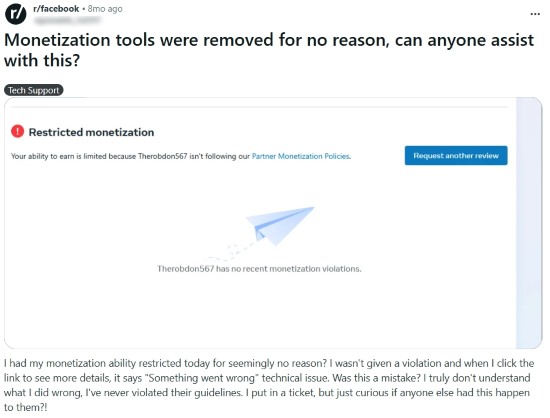
This message points to a Partner Monetization Policies issue that blocks monetization tools at the Page level, even if your posts look fine. Open Meta Business Suite, go to Monetization, then open Policy issues to see the exact reason tied to your Page. Complete the step shown there, then return to Monetization and rerun this checker before you publish again.
My dashboard says “Invite only” for Content Monetization. What should I do?
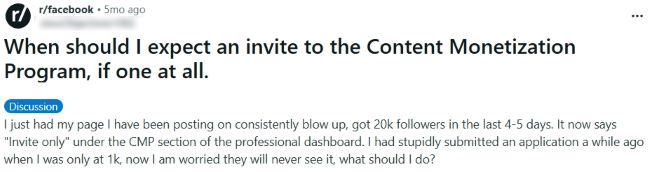
Invite only means Meta has not opened that program for your Page yet, or it has not unlocked it for your current standing. Go to Monetization and check your status screens so you know whether policy issues or availability limits block access. Keep publishing original, brand-safe posts, then check the Monetization screen again as your status updates.
Why does it say “Ineligible country” when my Page country looks eligible?
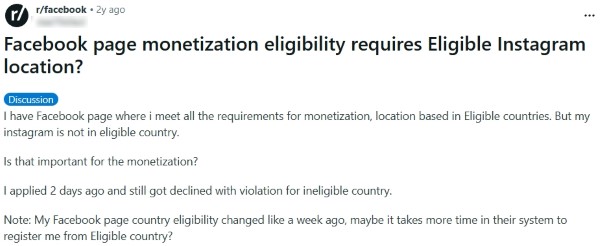
Country checks depend on what Meta has enabled for your account and on the specific program you applied for, so a mismatch can happen across products. First, confirm what Monetization shows for your Page, since that view reflects your current eligibility path. Then, cross-check Meta’s official Content Monetization availability list for countries and languages, and align your Page settings and publishing plan with what that list supports.
My Page lost monetization after an IP or copyright strike. How do I earn again?
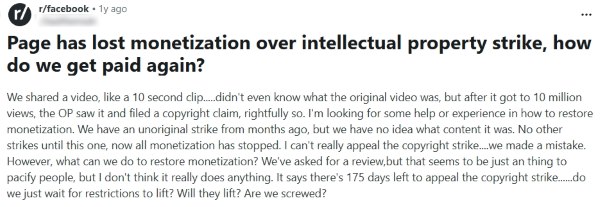
A copyright or IP action can limit monetization even when your Page meets other requirements, because rights issues sit on top of earning eligibility. Check Monetization and your copyright notices so you understand whether a rights holder match collects earnings, whether revenue sharing applies, or whether the video needs a change. Replace the audio with a safer source, or dispute the match when you hold the rights, then publish again with documentation so your next post stays stable.
What to remember
Partner Monetization Policies grant access to monetization, while Content Monetization Policies judge each post or video on its own. Without passing both, no content strategy can reliably generate earnings.
The Professional Dashboard is Meta’s official source of truth, and every eligibility or restriction lives there. Use the Checker only to spot and fix issues quickly before confirming in the dashboard.
Plan for change as Meta consolidates monetization programs in 2025. Build a strategy that adjusts to current availability, and keep receipts, screenshots, and logs for every change so you can prove compliance when needed.

At Audiodrome, we create interactive tools designed to simplify music licensing and monetization. They help creators, agencies, and businesses avoid common mistakes, save time, and stay compliant while building content that earns fairly across platforms.
Each tool translates complex rules into clear, practical guidance. Our goal is to give you confidence before publishing, ensuring your projects are protected, professional, and ready to succeed in a fast-changing media landscape.


