
What is Instagram Copyright Infringement, What Triggers It, and How to Avoid It (2026 Guide)

Audiodrome is a royalty-free music platform designed specifically for content creators who need affordable, high-quality background music for videos, podcasts, social media, and commercial projects. Unlike subscription-only services, Audiodrome offers both free tracks and simple one-time licensing with full commercial rights, including DMCA-safe use on YouTube, Instagram, and TikTok. All music is original, professionally produced, and PRO-free, ensuring zero copyright claims. It’s ideal for YouTubers, freelancers, marketers, and anyone looking for budget-friendly audio that’s safe to monetize.
Creators hear the same advice on repeat. Give credit. Use only a short clip. Change the pitch. Add a voiceover. On Instagram, those shortcuts still lead to muted audio, removed posts, and copyright warnings. Instagram works off rights and permissions, not intent. Your caption can look respectful and your edit can look original, yet the platform can still flag the post.
This guide explains copyright infringement in Instagram terms, with simple examples that match real posting workflows. You will learn what triggers problems, what outcomes to expect, how to prevent issues with a clean proof process, and what to do when something goes wrong. This article shares education, not legal advice.


What is copyright infringement on Instagram?
Copyright infringement on Instagram happens when you post music, video, photos, or graphics that belong to someone else and you lack permission for that use. Copyright gives the creator control over copying, posting, and sharing. When your post crosses that line, Instagram can restrict the content, and the rights owner can act through reports too.
What counts as “copyrighted” content on IG
A song includes two sets of rights: the recording and the underlying composition. When you use a track, you need permission that covers both the sound file and the songwriting, even for a background clip.
Movie scenes, TV moments, highlights, and game footage carry copyright in the video and the audio. Uploading a clip, even with edits or captions, uses someone else’s work and can trigger a match or report.
Photos, illustrations, logos, and artwork stay protected even when you add text, stickers, or filters. A meme still uses a copyrighted image, and the owner can file a report when the post spreads on Instagram.
Reposting a creator’s Reel or TikTok upload copies their video, audio, and editing choices. Even when you tag them, you still publish their work under your account, which puts the rights question on you today.
What doesn’t automatically make it legal
“I credited the artist.” Credit shows respect, yet copyright law focuses on permission, not attribution. A label, publisher, or creator can still object, and Instagram can still restrict your post because the rights holder controls use in that format.
“I don’t make money.” Nonprofit intent rarely changes the rights issue on Instagram because copyright covers copying and public sharing. Your post can still reach an audience, so the owner can act, and Instagram can still limit distribution fast.
“It’s only 5–10 seconds.” A short clip can still copy the part of a song or video that people recognize. Rights owners protect hooks and moments, so Instagram can match even brief segments, and you can still face action.
“Everyone uses this sound.” Popularity only shows that a sound spreads, not that it carries the right permissions for your use. Rights deals change, uploads differ, and enforcement varies, so your Reel can lose audio or get removed later.
“I changed the pitch / sped it up / added voice.” Edits change the feel, yet they still use the same underlying work and the same rights. Instagram can still recognize altered audio, and the owner can still claim infringement when your clip uses their material.
The 3 signals Instagram uses to decide if your post is risky
1. Source – Instagram reads risk through the source of your audio or video, which is why Instagram music copyright rules change based on where you get the track and how you use it. In-app music comes with platform permissions that fit that posting flow, while external audio can carry unknown rights. Ripped audio from YouTube or Spotify almost always lacks permission, while licensed tracks come with clear terms that support your use.
2. Usage – Instagram also looks at how you use the content, since the purpose changes the rights you need. A personal post sits in a casual lane, while branded content, promos, and boosted posts connect to marketing. Commercial intent means you sell, promote, run sponsorships, or publish for a client, and that intent raises the bar for permissions.
3. Proof – When a claim happens, proof matters as much as the content itself. Proof can look like a license file, an invoice or receipt, or an email that grants permission for your exact use. Finding a track online gives you access, yet access does not equal rights, and you cannot support a dispute with a link alone.
Each scenario shows what happens, why it creates risk, and the safer alternative you can use today.
“Claim”, “Mute”, “Block”, “Removal” – what each means
Instagram uses four enforcement outcomes for copyright and music issues. Understanding each one helps you choose the fastest fix and protect reach.
Claim
A claim means Instagram or a rights holder detected copyrighted material in your post and flagged it for review. The post stays visible, but you’ll see Account Status notices and guidance on next steps, including requesting a review or appealing. Claims can reduce distribution and pause some monetization features while the match is reviewed. If you have rights, submit proof using the in-app review path under Account Status and follow the steps to remove a copyright claim without guessing. If you lack rights, replace the audio and republish to restore performance.

Mute
Muting removes your audio when Instagram’s systems match music not cleared for your use. The video stays viewable, but the sound is disabled. Replace the track once in the editor or reupload using cleared music from Sound Collection or royalty-free music that stays safe for Reels, Stories, posts, and ads. Muted posts often underperform because viewers can’t hear your message, hooks, or transitions. You keep views and comments, but watch time and conversions drop.

Block
Blocking limits who can see your video when rights holders restrict distribution by region or placement. Instagram detects a match and prevents playback in affected areas. Your post is unavailable there, even if it plays for you or your followers elsewhere. Blocks cut off reach in affected regions and can break campaigns aimed there. Ads won’t deliver where playback is blocked. Restore distribution by swapping to cleared music, then republish or replace audio. Keep documentation if you request a review and restoration.

Removal
Removal means Instagram took down your post after a rights holder’s report or policy decision. The content disappears from your profile, and viewers can’t access it. You’ll see the reason in Account Status and options to request review or appeal. Removal stops reach entirely and can affect account standing or monetization eligibility until resolved. If you have rights, use Account Status to request review and upload proof. If you don’t, fix the asset, secure licenses, and publish a compliant version.

How to avoid Instagram copyright infringement (the safe workflow)
You avoid copyright problems on Instagram by making one clear decision before you edit, then you back it up with proof you can show fast.
Step 1: Choose the right audio route
Start by choosing the route that matches your goal, since each route comes with different permissions. For personal, casual posts, use in-app music when Instagram offers it for your account and region. For brand work and client deliverables, use licensed or cleared music you can document, and for ads or boosting, choose music that includes explicit ad permissions.
Step 2: Match the license to your use
After you pick your lane, match the license to the way you plan to publish. Check the platform you will use, the countries you target, the time period you need, and whether you will monetize, boost, or run ads, plus any client or brand use your agreement must cover. If you cannot answer those basics in plain words, pause and pick a safer option.
Step 3: Save proof the moment you download or buy
Once you choose a track, save proof at the same time, since you will want it ready before a problem appears. Keep the license PDF or receipt, the track link with the title and artist, the purchase date, and the project name or client. Add a short music log paragraph that states where you got the track, what license you bought, and where you will use it.
Step 4: Publish with fewer surprises
Finish with a workflow that prevents last-minute changes that create risk. Lock your audio early, then keep a backup track ready in case Instagram limits the first choice at publish time. Save your exports and your project file versions, so you can swap audio fast without rebuilding the whole edit.

Before Posting Checklist
What to do if your audio is muted, removed, or you got a copyright notice
When Instagram flags your post, you need a calm, proof-first response that matches the exact action Instagram took.
First: identify what actually happened
Start by naming the outcome, since each one needs a different fix. A mute keeps your post live but removes sound and can show “audio unavailable” to viewers. A removal takes the post down, while a warning signals a rights issue that can affect account standing if you repeat it.
If audio is muted
Open the Reel editor and replace the audio inside Instagram so you keep the visuals and restore a clean soundtrack. Use your own voice or original audio with a licensed music bed that fits your goal and permissions. If a short segment triggers the match, re-edit and re-export without that segment, then upload the corrected version.
If the post is removed
Before you consider an appeal, gather the basics so you respond with facts, not emotion. Save screenshots of the notice, the post details, the audio or clip name, the timestamp segment, and any link Instagram shows for the claim. Pull your license, receipt, or permission email and confirm the scope matches the Instagram posting and your use type.
File an appeal only when you hold clear rights that cover the exact content and the exact use. A solid appeal fits cases where you own the footage, you created the audio, or you bought a license that covers Instagram and the way you used it. If you lack proof, an appeal can waste time and increase account risk, so choose a fix instead.
If you have permission or a license
Present proof like you want a reviewer to decide in one minute. Share the license or permission document, the track or clip identification, the date, and a short sentence that matches your use to the license scope. Avoid long stories, claims about credit, or arguments about fairness, and focus on the permissions you can show.
If you don’t have rights
Choose a clean rebuild path that removes the rights issue at the source. Replace the music with in-app audio that fits your account type, or use licensed music that covers your posting plan, or recreate the post with your own audio and visuals. If the post relies on a copyrighted clip, remove that clip and rebuild with original footage.
How to prevent repeats
After you fix the one post, lock in a repeatable proof workflow for the next one by checking your audio choices before you publish. Save your licenses and receipts in a single folder, keep a backup track ready, and pick audio based on whether the post stays personal, promotes a brand, or runs as paid media. When you can explain your source and permissions in one sentence, you publish with confidence.
Fair use on Instagram (why it rarely saves you)
Fair use can protect criticism, commentary, or parody when you transform the original and focus on your message, not the source. On Instagram, keep purpose obvious: show context, add analysis, and avoid using more than needed to make your point.

Short clips or quotes don’t automatically count as fair use. You still need purpose, transformation, and minimal taking. Use only what your point demands, credit the source, and add commentary or critique so viewers understand why you included it.
Ads, boosts, and brand posts serve commercial goals, which weigh against fair use. When you promote products or services, expect rights holders to challenge you. License the music or footage in advance, or use Meta Sound Collection or commissioned assets.
Skip arguing fair use in comments. Build proof. Save licenses, receipts, track IDs, supplier URLs, and permission emails before posting. When a claim appears, open Account Status, submit documents, and request review. Solid evidence restores posts faster than debates will.
Instagram Copyright FAQs
These questions come straight from real creator situations, rewritten in plain language so you can scan fast and act with confidence.
What proof does Instagram want when I file a report or dispute a claim?

Instagram wants proof that you have the right to act, either because you own the work or the owner authorized you. Send a clear license, contract, or permission email that names the content and matches your use, plus any reference number Instagram provides. Keep your message short, attach the key document, and explain in one sentence why you have authority.
Can Instagram disable my account for IP violations even if I post my own work?

Yes, Instagram can restrict or disable an account when it sees repeated IP reports or a pattern it flags as high risk. When you create the work, you still need to prove ownership in a way Instagram can review quickly, especially during disputes. Save original files, export timestamps, and project history so you can show creation and stop repeat reports from piling up.
My Reel got taken down for copyright, can I contact the owner and restore it?
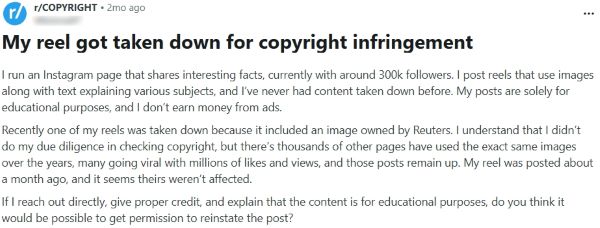
You can contact the rights owner and ask for written permission, but credit alone will not restore the post. If the owner agrees, you need clear confirmation that covers Instagram posting and the exact image, clip, or audio you used. If you cannot get permission, rebuild the Reel with licensed or original content and reupload a clean version.
What penalties can Instagram apply for repeated copyright issues?

Instagram can limit reach, mute audio, remove posts, and restrict features such as monetization, Live, and ads. Repeat issues can push your account into stricter enforcement, where new posts face higher friction and faster takedowns. The safest way to avoid escalation is to fix the source, keep proof, and stop reposting content you cannot license.
Why is my video blocked in some countries, and how do I know the notice is real?

Country blocks happen when rights for a song or clip apply only in certain regions, so Instagram limits playback where the rights do not clear. To confirm the notice, check the alert inside the Instagram app and match it to the exact post and audio, rather than trusting a random email link. If anything feels off, open Instagram directly, review Account Status, and avoid clicking verification prompts.
Why do I get copyright alerts when I add music to Stories?

This usually happens when you add music from a source that lacks posting permission for your account type, region, or use. Switch to Instagram’s in app music options where available, or use licensed music you can document for brand and promotional work. If it still triggers alerts, lower or remove ambient venue audio and rebuild the Story with clean audio.
Post with confidence, not guesswork
Copyright trouble on Instagram rarely comes from bad intent. It comes from unclear permissions, risky sources, and missing proof when something changes. Pick your audio route before you edit, save proof the moment you choose a track, and keep a backup ready. When you can explain your source and rights in one sentence, you post with control.



Audiodrome was created by professionals with deep roots in video marketing, product launches, and music production. After years of dealing with confusing licenses, inconsistent music quality, and copyright issues, we set out to build a platform that creators could actually trust.
Every piece of content we publish is based on real-world experience, industry insights, and a commitment to helping creators make smart, confident decisions about music licensing.


