
Instagram Sound Collection Rules: Safe, Ad-Ready Music for Reels, Stories & Posts

Audiodrome is a royalty-free music platform designed specifically for content creators who need affordable, high-quality background music for videos, podcasts, social media, and commercial projects. Unlike subscription-only services, Audiodrome offers both free tracks and simple one-time licensing with full commercial rights, including DMCA-safe use on YouTube, Instagram, and TikTok. All music is original, professionally produced, and PRO-free, ensuring zero copyright claims. It’s ideal for YouTubers, freelancers, marketers, and anyone looking for budget-friendly audio that’s safe to monetize.
If you’re publishing on Instagram (Reels/Stories/Posts/Ads/Subscriptions), here’s when Sound Collection is the safest option, and how to avoid the common Instagram failures (boost blocked, muted audio, missing tab, policy gates).


What does Sound Collection Mean on Instagram?
Instagram’s Sound Collection is Meta’s royalty-free library of music and sound effects for videos you publish on Instagram (and Facebook). Instead of relying on trending songs that can disappear, get restricted, or block promotion later, you can pick audio from a catalog designed for predictable, platform-safe use.
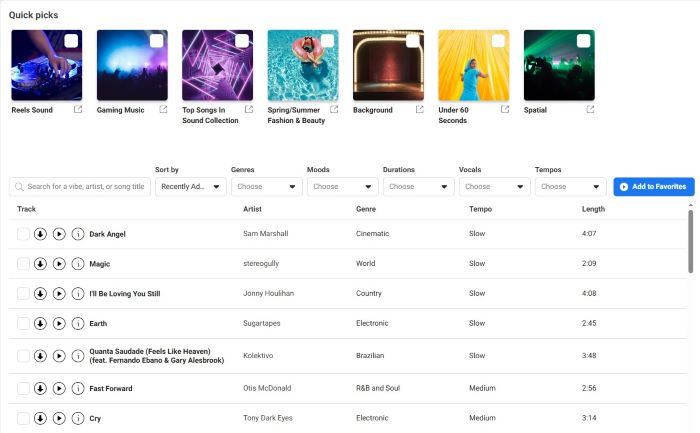
You can use Sound Collection through Meta’s Sound Collection site to download tracks for desktop editing, and in some Instagram creation flows, it may also appear inside the audio picker under a “Royalty-free” tab (availability varies by account, region, and rollout). Unlike the in-app Instagram Music Library, which focuses on licensed commercial songs with changing access and usage limits, Sound Collection is built for consistent rights coverage across Meta surfaces.
Where Sound Collection shows up on Instagram (Reels, Stories, Posts)
Sound Collection works anywhere you build video on Instagram. It gives you ready-to-use tracks and effects that won’t trigger last-minute surprises. Use it when you plan a Reel, a Story, or a feed post, and you need a clear workflow for adding music to Instagram posts, Stories, Reels, and ads. It also fits multi-clip edits and simple photo posts with motion, keeping your workflow tidy smoothly.
Use Sound Collection across Reels, Stories, and feed video, plus some posts with motion. Add audio during the editing step inside Instagram, or import a track you downloaded. Either route keeps your soundtrack aligned to cuts, captions, and sticker timing.
Downloads happen on desktop, so save the file and track’s ID or link for your records. If you add audio in-app, screenshot the track page. Keep these receipts – they help you document what you used if an appeal comes up.
Regional and account-type limitations mainly affect the Instagram Music Library of commercial songs. When that library isn’t available, or a song goes missing, Instagram steers you to Sound Collection. Treat it as the reliable fallback, keeping videos playable across surfaces.
Why Sound Collection may be missing in Instagram (and the reliable workaround)
Instagram shows different audio options based on your account type, and that changes what you can pick inside the editor. Personal and Creator accounts often get broader music choices, while Business accounts see tighter options because Instagram expects commercial use. If you run a Business profile and you want predictable audio for posting or promotion, start your planning with Sound Collection.
Instagram also rolls out audio features by country, and the timing rarely looks consistent. Two people can follow the same steps and still see different menus because Instagram enables tools in waves. If you do not see a “Royalty-free” area today, use Sound Collection through the desktop library and keep publishing while Instagram catches up.
Instagram surfaces do not share one audio system, so what appears in Reels can differ from what you see in Stories or feed video. Reels often exposes more audio options, while Stories and feed posts can limit what you can add, especially when you edit after filming. If you build photo posts with motion, Instagram may hide audio choices or place them in a different step of the publish flow.
When Instagram hides Sound Collection in the app, the desktop route gives you the steady workflow. Pick a track in Sound Collection on desktop, download it, add it to your edit, then upload the finished video to Instagram. Save the track link and download date with your project so you can answer questions fast later.
Ads and boosting on Instagram: the rules that prevent blocks
When money or partners are involved, treat audio choice as a compliance decision, not a vibe decision.
Boosting trap
A Reel can perform well with a trending song, then hit a wall the moment you try to boost it. Boosting shifts your post into a paid review flow, and Instagram checks music rights with stricter rules. Sound Collection keeps your creative promotable because it uses royalty-free audio designed for Meta placements.
If you plan to boost, choose Sound Collection during editing so your audio stays eligible when you promote. If a boost fails after you publish, swap the audio to Sound Collection, export a fresh version, and upload again. Save the track link or ID and the download date in the same folder as your export so you can answer review questions fast.
Reels ads: what to use instead of in-app licensed music
Reels ads need music that fits paid distribution rules, so you want audio you can stand behind in a review. In-app licensed songs often work for casual posting, but Instagram ads demand cleaner rights. Sound Collection gives you a safer lane for Ads Manager, branded work, and repeatable campaigns.

For ads, pick Sound Collection music or sound effects for the cleanest approval path. Use original audio when you record voice or sound in your own shoot, then keep the project file as proof of source. When a brand requires a specific track, Sound Collection, or royalty-free music becomes the key decision. Use a separate commercial license that matches the campaign scope and store that license with the creative.

Adding music in Ads Manager
Ads Manager lets you attach music to your video creative. Use the “Add music” option in the creative editor, then pick safe sources. Confirm final exports align with platform rules before launch and document the track you used in your ad files.

Teams sometimes upload a silent cut and add audio inside Ads Manager. That works, but the same rules still apply: avoid in-app licensed music for ads. Choose royalty-free audio you can show proof for, with track links or IDs saved alongside the ad version.
Sound Collection is the ad-safe default because tracks are royalty-free and cleared by Meta for use on Facebook and Instagram, which reduces claim risk and makes approvals smoother. Keep the download plus the track page or ID as your proof trail.
Two-version workflow (organic vs paid safe)
Build two versions when you want speed and flexibility. The organic version lets you test hooks and pacing with the sound style that fits the feed. The paid safe version keeps the same edit but swaps the soundtrack to Sound Collection so you can boost or run ads without a rebuild.
Publish the organic version first and watch for strong retention, saves, and shares before you spend budget. Then export a paid safe version that keeps the same visuals, captions, and timing, with Sound Collection audio added early so nothing drifts out of sync. Store both exports side by side with the Sound Collection track link and download date so you can reuse the winning concept fast across campaigns.
Brand/partnership
Partnership and branded content formats add policy layers, so keep the music choice simple. Use Sound Collection or original audio unless you hold commercial rights. Save proof and check the partnership eligibility screens before tagging partners or converting posts into partnership ads.
.jpg)
Subscriber-Only Content (IG Subscriptions) – Stricter Rule
Subscriber-only posts follow a stricter rule. Instagram says you can use music only from Meta’s Sound Collection or music you own or are specifically authorized to use. That excludes general licensed or trending songs from the in-app Music Library entirely.
%20%E2%80%93%20Stricter%20Rule.jpg)
Because subscribers pay for access, Instagram enforces clean rights to keep exclusive videos playable and monetizable. Sound Collection tracks meet that bar, while un-cleared songs risk mutes or removals. Treat Sound Collection as the default for Instagram stories, reels, and feed posts with music.
Build a repeatable workflow. Choose a Sound Collection track on desktop, download it, and edit it into your cut. If you use your own licensed track, keep the license file handy. Avoid swapping in-app to a trending song before publishing.
Monetization Implications (when Sound Collection helps)
Monetization starts with policy gates. Your account must meet Meta’s Partner Monetization Policies and your content must follow Instagram’s content monetization rules. Sound Collection tracks simplify the music part, reducing copyright claims that disrupt eligibility and helping videos pass checks.
For Reels that run ads, Meta’s guidance is clear: only royalty-free music from the Facebook audio library and Meta Sound Collection qualifies for full monetization. That’s the safe lane when revenue matters, especially for relying on Ads Reels payouts.
%201.jpg)
Always confirm monetization status in Professional Dashboard under Monetization. Eligibility can vary by product or region, and features change over time. This article focuses on choosing audio; use your dashboard for status before posting, boosting, or applying Ads on Reels.
%202.jpg)
Sound Collection also helps in subscriber products and paid access tiers. Instagram requires either music you own and control or tracks from Meta’s Sound Collection for subscriber-only content. If your business uses paid perks, default to Sound Collection to protect revenue and avoid takedowns that upset paying fans.
Keep clean documentation for every upload. Save the downloaded audio file, the track page or ID, and a quick note on where you used it. If a review or appeal occurs, those receipts show that you chose platform-approved, royalty-free audio under the Sound Collection terms.
Workflow on Instagram: Creator vs Brand (fast decision tree)
Different teams ship faster when they follow a simple, repeatable audio workflow tuned to Instagram’s rules and the realities of boosts, ads, and partners.
Creator
Start by testing Instagram’s in-app audio on your draft. If a needed song isn’t available, shows warnings, or feels risky for later monetization, switch early to a Sound Collection track. You’ll keep editing momentum and avoid re-cuts before publishing altogether.
Create a simple proof note as you edit. Save the track’s title, URL, or ID, file name, and where you used it. Screenshot the track page if you added it in-app. Store everything with your project files for quick retrieval.
If you plan to monetize or boost later, choose Sound Collection from the first cut. That choice prevents blocked boosts, preserves audio timing, and protects eligibility. Publish, then reuse the same master for ads without rebuilding captions, stickers, or transitions.
Brand/Agency
For paid or partnership work, set Sound Collection as the default. If you license separate music, get a music license agreement for Instagram that explicitly permits Instagram placements, ads, and boosts. Name the account, surfaces, and term. Keep the license with the creative for audits.
Reels ads do not allow licensed music. When you adapt an organic concept, swap the soundtrack to Sound Collection or original audio before trafficking, then rebuild the Reel with the new audio. Re-export with rights, then upload to Ads Manager. Document the track source in the campaign folder.
Store proof for every placement. Keep the downloaded audio file, the track page or ID, and screenshots from Ads Manager showing the creative. Note flight dates and ad set names. This trail speeds reviews and keeps delivery stable during checks.
Workflow on Instagram: Creator vs Brand
Follow the safest path for ads, boosting, subscriptions, and proof.
- Prevents “boost unavailable” surprises.
- Keeps your timing/cuts stable for paid versions.
- Save proof: track URL/ID + screenshot + export file name.
- Best for truly personal, non-promoted posts.
- If a track disappears or shows warnings, switch early to Sound Collection.
- Keep a quick note of the audio choice in case plans change.
- Track title + URL/ID
- Download/add date
- Where used (post link, campaign name, or project folder)
- Safer across placements (ads/boosts/branded content).
- Keep a proof bundle in the campaign folder.
- One license that “travels with the file.”
- Store the license PDF + invoice + terms in the proof pack.
- Keep Sound Collection for Meta-only versions when needed.
- Download + log the track URL/ID.
- Save screenshots from Ads Manager (creative + music).
- Note flight dates + ad set names for audits.
- Swap to Sound Collection/original audio before trafficking.
- Re-export a clean paid master.
- Save track source + campaign folder proof.
Muted audio, “boost unavailable,” and rights-match warnings: fixes that work
If you can’t find licensed tracks in the in-app Music Library or your audio got muted, switch to a Sound Collection track because Instagram music copyright rules can still flag licensed audio when your use changes. Open the desktop library, choose a similar mood and tempo, re-cut your edit, and republish. This fix restores playback and reduces future flags.
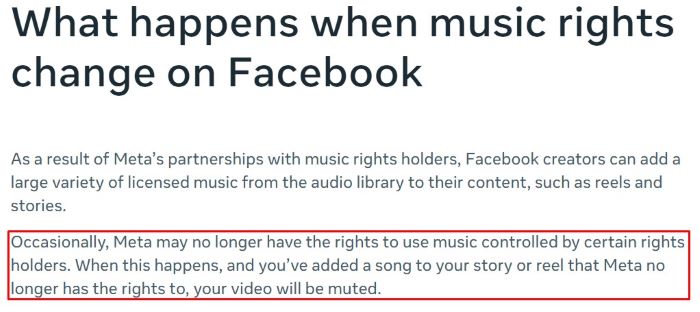
If a song you used disappears later, replace it with a Sound Collection track to keep delivery stable. Rebuild the export with the new audio, check captions and cuts for sync, and update any boosted versions. Reposting with Sound Collection often clears reach issues tied to music availability.
When you work on desktop, download the Sound Collection file and save its details. Keep the track title, URL or ID, duration, and any notes about allowed use in your project folder. Store the final export alongside these receipts so audits, reviews, or appeals move quickly.
Proof to keep for Instagram (minimum viable receipts)
Keep a proof bundle for every post that includes the track title, ID, and URL, the download or add date, the project or post URL, and any license documents for non-Sound Collection music, especially when relying on free music for Instagram.

Teams move faster when proofs live in one place. Centralize track receipts, exports, and approvals in your Audio Library: Compliance, Proof & Client Workflows hub. Use file names, folders, and checklists so editors, account managers, and clients can verify rights.
FAQs
Quick answers to the most common “it’s Instagram’s music – so why is it still risky?” questions, with simple fixes you can apply before you post, boost, or monetize.
Can I use Instagram’s built-in music in Stories or Reels without risking monetization issues?

Usually it’s safer than random third-party audio, but “provided in-app” does not mean “always monetization-safe.” If you plan to monetize or boost, start with Sound Collection (or original audio), because licensed in-app songs can trigger restrictions for commercial use. If you’ve had a recent restriction, keep it extra clean for a while: one audio source per export, save the track link/ID, and avoid last-minute swaps.
I downloaded a Sound Collection track on my laptop – how do I use it on my phone for Reels?

Download the track on your desktop, then move it to your phone the same way you move any project asset (cloud drive, AirDrop, USB, or email to yourself), and keep the filename intact. Import that file into your editing app, export a fresh video, and upload the final cut to Instagram – don’t try to “add the same track again” in-app at the end. Save the track page link/ID and your download date in the project folder so you can prove what you used later.
Is Sound Collection safe for monetized videos, or can it still trigger copyright claims?

Sound Collection is designed to reduce rights friction on Meta platforms, but it’s not a guarantee that you’ll never see a claim or a match. Automated systems can still flag audio through matching, reuse, or mixdowns – even when your source was Sound Collection. Treat Sound Collection as the safest default for Meta publishing, and protect yourself with proof: track URL/ID, download date, and a quick terms snapshot saved the day you grabbed the track.



Audiodrome was created by professionals with deep roots in video marketing, product launches, and music production. After years of dealing with confusing licenses, inconsistent music quality, and copyright issues, we set out to build a platform that creators could actually trust.
Every piece of content we publish is based on real-world experience, industry insights, and a commitment to helping creators make smart, confident decisions about music licensing.


